 Research
 March 18, 2026
Hyoketsu – Solving the Vendor Dependency Problem in RE
The Long Decompilation Process
Over the last eight or so years of performing security research at Assetnote, our research team has looked at countless enterprise applications that ship with hundreds, sometimes thousands, of vendor dependencies. This problem tends to be worse in larger enterprise applications that follow the typical Java/C# monolith approach, and it has always been a hindrance when trying to reverse engineer and analyze the proprietary source code of an application, rather than drowning in vendor code that doesn’t form the exposed attack surface of an application.
To visualize this example, here’s what a snippet of the WEB-INF/lib/ directory looks like for Tableau, which is a massive Java application:
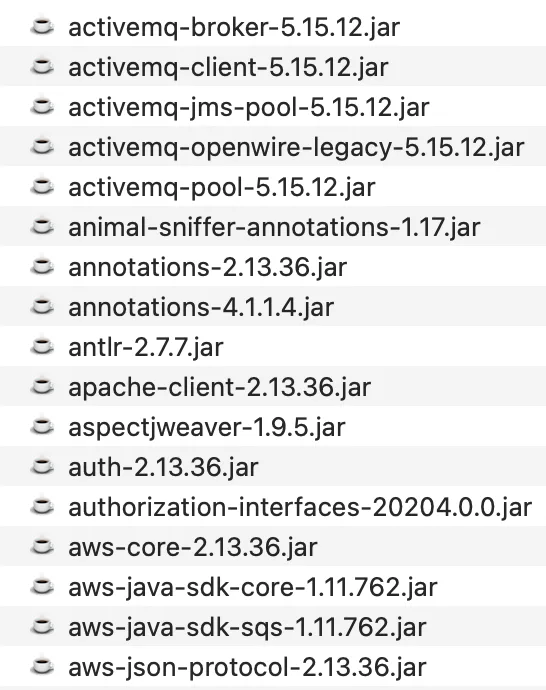
In the case above, we see JAR files developed by Tableau scattered in between vendor dependencies. Usually our goal is to analyze all the custom code for a software product, and the vendor dependencies add a lot of noise to the equation, as we typically have to decompile everything and sort through the mess of decompiled code.
The time it takes to decompile everything also greatly increases, making us less effective in terms of how long it takes before we can start auditing a code base. In some cases, this decompilation process can require beefy servers and a lot of parallel processing, often duplicative work, and a huge annoyance in the reverse engineering process.
Introducing Hyoketsu – Automated Filtering of Vendor Dependencies
At some stage, we got frustrated enough to solve this problem once and for all. We built a tool called Hyoketsu, which automatically filters out vendor dependencies using three identification methods:
- Microsoft runtime detection – We parse the PE headers of .NET assemblies and extract public key tokens from the assembly metadata. Microsoft signs all of their framework assemblies with a set of well-known keys (ECMA, Microsoft extended, .NET Core, .NET Standard), so we can instantly identify any Microsoft-shipped assembly without needing a database lookup at all.
- Hash matching – SHA256 for NuGet (DLLs) and SHA1 for Maven Central (JARs), giving us exact binary identification of files published on public registries.
- Filename matching – A fallback against 12M+ DLLs and 14M+ JARs for cases where vendors recompile or patch open-source libraries, changing the hash but keeping the filename.
The tooling uses a local SQLite database of these hashes, collected through looking at the indexes of Maven Central (JARs) and NuGet (DLL files), and correlates your local files with these filenames and hashes in a prebuilt database.
The only downside of this approach is that we have to maintain a database of these filenames and hashes, and it can take some time to calculate. This is a one-off cost, and for the most part, this database does not have to be updated that often.
As a part of this release, we’re making our pre-calculated database available to everyone for free. It’s 13.3 GB and covers both JAR and DLL file types. The tool will automatically download the database on first run if it does not already exist, and we also provide a way to update this database if you wish via the tool itself (indexing Maven and NuGet yourself).
You can obtain Hyoketsu at our GitHub repo here: https://github.com/assetnote/hyoketsu
Building the Database – Where the Hashes Come From
The database is built from two sources: Maven Central for Java JARs and NuGet for .NET DLLs. The two registries work very differently, so we had to take different approaches for each.
Maven Central publishes a Lucene index at repo.maven.apache.org/maven2/.index/nexus-maven-repository-index.gz – a ~2.6 GB gzipped binary file that contains a record for every artifact ever published. We download and parse this index directly. Each record has a set of key-value fields, and the two we care about are:
u– a pipe-delimited string containinggroupId|artifactId|version|classifier|extension. We filter for records where the extension isjarand the classifier isNA(the main artifact, not sources or javadoc).1– the SHA1 hash of the artifact.
From these two fields, we construct the JAR filename (artifactid-version.jar), the package name (groupid:artifactid), and store the SHA1 hash. The nice thing about Maven is that SHA1 hashes are already in the index, so the entire Maven crawl is a single download and parse and we get hash-based matching for free.
NuGet is more involved. The NuGet V3 Catalog API (api.nuget.org/v3/catalog0/index.json) is a paginated catalog of every package event – publishes, updates, delists. We crawl all catalog pages to collect “leaf” URLs, then fetch each leaf to get the package metadata. The leaf JSON includes a packageEntries array listing every file in the nupkg – we look for entries under lib/ that end in .dll and record the filename.
The problem is that the NuGet catalog doesn’t include file hashes. To get those, we have to actually download each .nupkg file (which is just a ZIP), extract the DLLs from lib/, and compute the SHA256 hash ourselves. This is the hash backfill step – it’s bandwidth-heavy and takes a while, but it’s what gives us exact binary matching for .NET assemblies.
The end result is a SQLite database with two tables – known_dlls for NuGet entries and known_jars for Maven entries – each storing the filename, package name, version, and hash. Entries are deduplicated by the combination of DLL name, version, and hash, so the same DLL shipping in multiple NuGet packages doesn’t bloat the database or lose hash data.
Operating Hyoketsu
When you first use Hyoketsu, if you do not have a local database built, our tool prompts you on whether you’d like to download our pre-computed database:
❯ ./hyoketsu scan /home/shubs/tableau/WEB-INF/lib/
No local database found at /Users/shubs/.hyoketsu/hyoketsu.db
A pre-built database from the Assetnote team is available (built March 1, 2026).
Would you like to download it? [y/N]: y
Downloading database (5994 MB)...
100% (5994 / 5994 MB)
Database downloaded successfully.
You can also explicitly download or update the database at any time:
./hyoketsu updateIf you’d like to build your own database and not rely on our pre-calculated database, you can use the --build flag which runs the full pipeline automatically – Maven crawl, NuGet crawl, hash backfill, and import:
# Build everything from scratch (~hours, needs good bandwidth)
./hyoketsu update --build --workers 128
The NuGet pipeline steps can also be run individually if you want more control:
# Step 1: Crawl the NuGet catalog for DLL filenames
./hyoketsu crawl-nuget --workers 128

# Step 2: Download nupkgs and compute SHA256 hashes
./hyoketsu hash-backfill --workers 128

# Step 3: Merge crawl data + hashes into SQLite
./hyoketsu import
All steps support resuming – re-running skips already completed work, so you can safely interrupt and restart without losing progress.
After having a database ready to use, the results from our tool will look like the following:
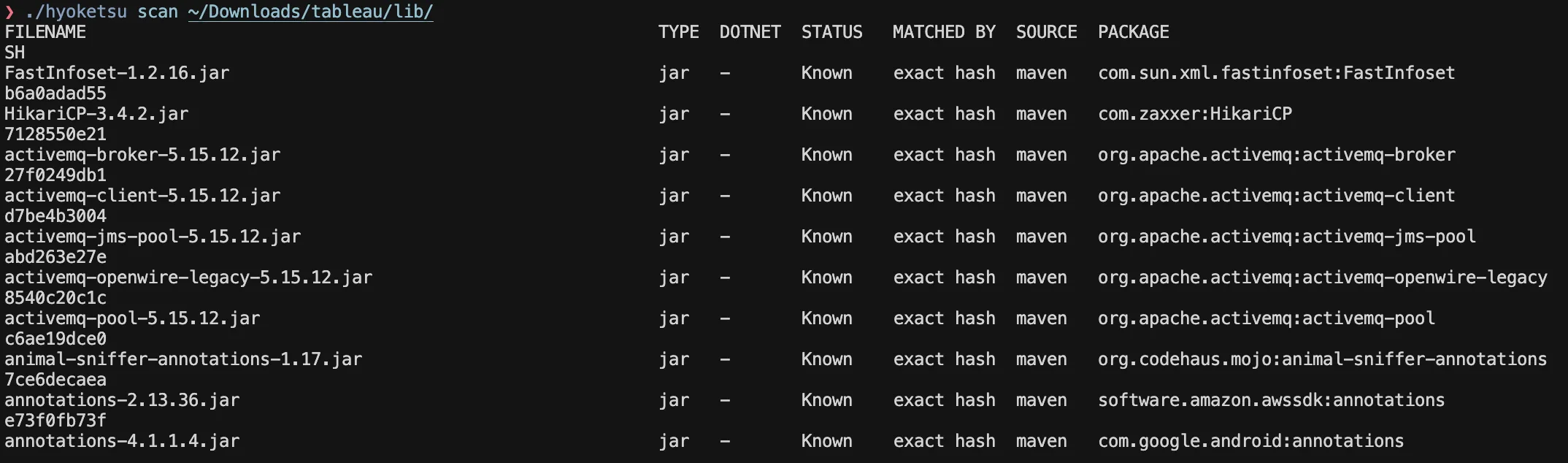
Anyone who has done reverse engineering in large-scale enterprise projects should understand the value of this filtering, and it’s absolutely glorious to see the output of Hyoktesu. It immensely helps in reducing the amount of processing it requires to understand proprietary code, as compared to vendor dependencies.
How Matching Works
When scanning a directory, Hyoketsu tries three approaches to identify each file – Microsoft runtime detection first, then hash, then filename.
For .NET DLLs, we first check if the assembly is signed with a known Microsoft public key token. We parse the PE headers and extract the public key from the assembly metadata table, compute its SHA1 hash, and compare the last 8 bytes (the token) against a set of well-known Microsoft keys. If it matches, we immediately mark the file as a Microsoft framework assembly – no database lookup needed. This catches assemblies like System.Runtime.dll, mscorlib.dll, and other framework libraries regardless of version.
For files that aren’t Microsoft runtime assemblies, we compute a hash – SHA256 for DLLs, SHA1 for JARs – and look it up in the database. If we get a hash hit, we know the file is byte-for-byte identical to something published on a public registry. It doesn’t matter if someone renamed newtonsoft.json.dll to json-helper.dll – the hash tells us exactly what it is.
If the hash doesn’t match anything, we fall back to a filename lookup. This is useful for cases we’ve run into a lot in practice – vendors recompiling an open-source library with their own signing key, or bundling a slightly patched version. The binary changes, but the filename stays the same. It’s not a definitive match the way a hash is, but it’s a strong signal, and the scan output tells you which method produced the match so you can make the call.
Detecting .NET Assemblies
One thing we had to deal with early on is that not every .dll file is a .NET assembly. Many applications ship with native Win32/Win64 DLLs alongside their managed code – these would never appear in NuGet and would just produce false negatives.
To handle this, we parse the PE headers of each DLL to check if it’s actually a .NET assembly. We only need to read the first 512 bytes of the file – we follow the PE header chain (MZ signature → PE offset at 0x3C → COFF header → Optional Header) and check the CLR Runtime Header at data directory index 14. If the CLR entry has a non-zero RVA and size, it’s a .NET assembly. This is the same check the Windows loader performs when deciding whether to hand execution off to the CLR.
When you pass --dotnet-only to a scan or extract, this is what’s filtering out the native DLLs – so you’re only looking at managed assemblies that can actually be matched against NuGet.
Extracting the Interesting Code
Identifying known vs unknown files is only half the problem – what we really wanted was a way to just hand our decompiler the custom code and nothing else. That’s what the extract command does:
# Extract unknown files, preserving directory structure
./hyoketsu extract /path/to/application /path/to/output

# Only .NET assemblies, skip duplicate hashes
./hyoketsu extract --dotnet-only --dedup /path/to/application /path/to/output

# Flatten everything into a single directory
./hyoketsu extract --flat /path/to/application /path/to/output
Under the hood, it runs a full scan and then copies only the files that didn’t match any known package. If an application ships with 780 JARs but only 38 are custom, you get a directory with just those 38 files – ready to feed directly into your decompiler. No more waiting hours to decompile hundreds of Apache Commons and Spring Framework JARs just to find the application’s own code buried somewhere in the output.
About Assetnote
Searchlight Cyber’s ASM solution, Assetnote, provides industry-leading attack surface management and adversarial exposure validation solutions, helping organizations identify and remediate security vulnerabilities before they can be exploited. Customers receive security alerts and recommended mitigations simultaneously with any disclosures made to third-party vendors. Visit our attack surface management page to learn more about our platform and the research we do.
in this article
Related Content
Research New Age of Collisions: Reading Arbitrary Files Pre-Auth as root in cPanel (CVE-2026-29205)
Find out more
Research Ghosts of Encryption Past – How we Read All Your Emails in Salesforce Marketing Cloud
Find out moreBook your demo: Identify cyber threats earlier– before they impact your business
Searchlight Cyber is used by security professionals and leading investigators to surface criminal activity and protect businesses. Book your demo to find out how Searchlight can:

Enhance your security with advanced automated dark web monitoring and investigation tools

Continuously monitor for threats, including ransomware groups targeting your organization

Prevent costly cyber incidents and meet cybersecurity compliance requirements and regulations